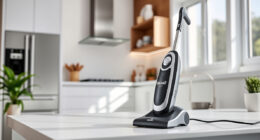
Keeping your Roborock Q7 M5+ robot vacuum in top condition ensures it performs efficiently and lasts longer. Regular maintenance prevents common issues like clogging, poor suction, or navigation errors. This guide provides practical, step-by-step instructions for cleaning, troubleshooting, and maintaining your device safely and effectively.
Whether you’re a new user or a seasoned owner, understanding the routine care for your Roborock will save you time and keep your home spotless. From cleaning filters to inspecting brushes, follow these detailed steps to optimize your robot’s lifespan and cleaning power.
Key Takeaways
| Regular filter cleaning prolongs suction power | Clean washable filters every 1-3 months for optimal performance. |
| Brush maintenance prevents tangling and improves cleaning | Check and clean main brushes weekly, especially with pets. |
| Empty dust bins regularly | Even with self-emptying, occasionally empty the dust bag if needed. |
| Navigation system accuracy depends on sensor upkeep | Clean LiDAR sensors and wheels monthly. |
| Troubleshoot common issues promptly | Address suction loss, navigation errors, or connectivity problems early. |

roborock Q7 M5+ Robot Vacuum and Mop, Upgraded from Q5 Max+, Up to 7-9 Weeks Self-Empty, 10000Pa Suction, Dual Anti-Tangle System for Pet Hair & Carpet, PreciSense LiDAR Navigation, App Control, Black
𝗨𝗽 𝘁𝗼 𝟳-𝟵 𝗪𝗲𝗲𝗸𝘀 𝗛𝗮𝗻𝗱𝘀 𝗙𝗿𝗲𝗲 𝗖𝗹𝗲𝗮𝗻𝗶𝗻𝗴: With a 2.7L sealed dust bag, the RockDock Plus efficiently collects...
As an affiliate, we earn on qualifying purchases.
Preparing for Maintenance
- Turn off and unplug the robot vacuum to ensure safety before any maintenance.
- Gather necessary tools: a soft cloth, small brush, and water for cleaning filters and sensors.
- Read the manufacturer’s manual for specific parts and cleaning instructions for your model.

4 Pack Washable Filter For Roborock Q5 Pro/Pro+(Plus)/ Max+(Plus)/ DuoRoller+, Q7/ Q7+, Q7 Max/Max+, Q8 Max/Max+ Robot Vacuum Cleaner Accessories Replacement Part True HEPA Filter For Robotic
Compatible Models: The True HEPA washable filter replacement parts are compatible with Roborock Q7, Q7+(Plus), Q7 Max, Q7...
As an affiliate, we earn on qualifying purchases.
Cleaning the Dustbin and Self-Emptying System
- Open the dustbin compartment and remove the 2.7L sealed dust bag.
- Empty the dust bag into the trash and inspect for any debris or blockages.
- Check the sealing gasket for damage and clean any dust residue around the opening.
- Replace the dust bag if it is full or shows signs of wear.
- Close the compartment securely to prevent dust leaks.
Maintaining the Filters
- Remove the washable filters from the vacuum.
- Rinse filters under cold water until clear, avoiding soap or detergents.
- Allow filters to air dry completely—preferably 24 hours—before reinstalling.
- Replace filters every 3-6 months or as needed based on usage.
Cleaning Brushes and Sensors
- Remove the main brush and side brushes according to the manual.
- Use a small brush or cloth to remove hair, pet hair, and debris tangled around the brushes.
- Inspect the wheels and sensors, wiping them gently with a soft, damp cloth.
- Ensure all parts are dry before reassembling.
Troubleshooting Common Issues
- Poor suction: Clean or replace filters; check for blockages in the intake port.
- Navigational errors: Clear dust and dirt from LiDAR sensors and wheels.
- Connectivity problems: Restart the app and robot; ensure Wi-Fi signal is strong.
- Unusual noises: Check brushes and wheels for debris or damage.
Tips and Warnings for Safe Maintenance
- Always power off and unplug the device before cleaning or inspecting parts.
- Use only recommended cleaning tools—avoid harsh chemicals or abrasive materials.
- Handle filters and sensors gently to prevent damage.
- Check for wear and tear regularly, replacing parts as needed.
- Keep small parts away from pets and children during maintenance.
The Products in This Guide

roborock Q7 M5+ Robot Vacuum and Mop
- ✔ Max Runtime: Up to 9 weeks
- ✔ Self-Emptying: Yes, 2.7L dust bag
- ✔ Navigation System: PreciSense LiDAR

4 Pack Washable Filter
- ✔ Pack Size: 4 filters
- ✔ Filter Type: HEPA
- ✔ Compatibility: Multiple Roborock models
roborock Q7 M5+ Robot Vacuum and Mop
The Roborock Q7 M5+ offers powerful suction, a self-emptying dust system, and advanced navigation. Regular maintenance ensures it continues to deliver top-tier performance, making it a reliable cleaning companion.
Pros:
- Powerful 10000Pa suction
- Self-emptying with 2.7L dust bag
- Dual anti-tangle system
- Precise LiDAR navigation
Cons:
- Requires regular filter cleaning
- Self-emptying system may need occasional checking
- Higher upfront cost
Best for: Pet owners and busy households seeking low-maintenance, high-performance cleaning
Not ideal for: Users looking for a budget-friendly option or minimal upkeep
Bottom line: The Roborock Q7 M5+ combines robust cleaning power with smart features, but regular maintenance is key to keeping it performing flawlessly.
4 Pack Washable Filter
Replacing or cleaning filters regularly ensures your Roborock maintains strong suction and air quality. The 4-pack washable HEPA filters are a cost-effective choice for ongoing maintenance.
Pros:
- Compatible with multiple models
- Washable and reusable
- True HEPA filtration
- Easy to install
Cons:
- Not OEM, but performs equally
- Needs replacement every few months
- Requires regular washing
Best for: Long-term filter upkeep and cost savings
Not ideal for: Users preferring OEM parts or minimal maintenance
Bottom line: This washable filter pack offers an effective, economical way to keep your Roborock’s filtration system running smoothly.
Frequently Asked Questions
How often should I clean the filters?
Washable filters should be cleaned every 1-3 months, depending on usage and pet presence, to maintain optimal suction.
Can I use regular water to wash the filters?
Yes, rinse them under cold water without soap. Make sure they are completely dry before reinstalling to prevent mold or damage.
What should I do if my robot’s navigation malfunctions?
Clean the LiDAR sensor and wheels regularly. Remove any dust or debris that might interfere with sensor accuracy.
How do I troubleshoot poor suction?
Check and clean the filters, ensure brushes are free of hair and debris, and inspect for blockages in the intake port.
Is it safe to perform maintenance while the robot is charging?
No, always unplug and turn off your robot before performing any cleaning or inspection to avoid electrical hazards.
Keep Your Roborock Running Like New
Proper maintenance of your Roborock Q7 M5+ is essential for its longevity and effectiveness. Regular cleaning of filters, brushes, and sensors, along with prompt troubleshooting, ensures your robot continues to deliver powerful, efficient cleaning. Following this comprehensive guide will help you enjoy hassle-free, spotless floors for years to come.
Affiliate disclosure: As an Amazon Associate we earn from qualifying purchases. Prices and availability are accurate as of the time of publishing.