
SimpliSafe’s 8-Piece Wireless Home Security System is my best overall pick for readers who want a coordinated alarm setup, while Ring Alarm’s 14-Piece System suits larger homes and TP-Link Tapo SolarCam C402 is a standout for outdoor coverage without routine charging. The main choice is between a full alarm system with sensors and a camera-led setup that watches specific areas. Connectivity, installation effort, alert features, and ongoing service needs can matter as much as the number of devices in the box. A larger kit may cover more entry points, but it can add setup work and complexity. Continue reading for the full breakdown and guidance on matching a system to your home.

Get home appliances delivered free with Prime
- Fast, free delivery on millions of items
- Prime Video, Amazon Music and more included
- Member-only deals all year
Complete the kit


Key Takeaways
- Full alarm kits and camera bundles solve different problems: SimpliSafe, Ring, and PGST kits pair a hub or alarm with sensors, while the GNCC, Kasa, and AOQEE products focus on indoor camera monitoring.
- SimpliSafe leads as the balanced alarm choice: its 8-piece kit offers a coordinated starting point without the larger device count of Ring’s 14-piece system or PGST’s 22-piece bundle.
- Ring and the 22-piece PGST kit target broader coverage: they make more sense when a home has multiple monitored doors or rooms, though a larger bundle can mean more setup and device management.
- Connectivity separates the PGST kits from simpler camera picks: Wi-Fi and 4G support can give alarm users an alternate connection path, while cameras such as Kasa EC71 are better suited to focused indoor viewing.
- Outdoor power needs change the decision: Tapo SolarCam’s solar kit is distinctive for reducing charging routines, whereas indoor models such as GNCC and AOQEE are not substitutes for weather-ready exterior coverage.
| PGST 9-Piece Home Security System with Wi-Fi and 4G |  | Best for Expandable Entry Monitoring | Included components: Base station, keypad, four door/window sensors, two motion detectors, two remote controls | Connectivity: 2.4 GHz Wi-Fi and 4G | Controls: App, push button, remote, and voice | VIEW ON AMAZON | See Our Full Breakdown |
| PGST 22-Piece WiFi and 4G Home Security System with 2K Camera |  | Best All-in-One DIY Kit | Included set: 22 pieces | Camera resolution: 2K | Connectivity: 2.4 GHz Wi-Fi and 4G SIM | VIEW ON AMAZON | See Our Full Breakdown |
| GNCC 2K Indoor Security Camera with AI Motion Tracking |  | Best for Indoor Camera Coverage | Resolution: 2K (1920p) | Pan and tilt: 340° horizontal and 80° vertical | Night vision range: 10 meters | VIEW ON AMAZON | See Our Full Breakdown |
| TP-Link Tapo SolarCam C402 Kit 1080p Outdoor Security Camera |  | Best for Wire-Free Outdoor Monitoring | Resolution: 1080p | Battery life: Up to 180 days per charge | Solar charging: 45 minutes of direct sunlight provides up to one day of use | VIEW ON AMAZON | See Our Full Breakdown |
| SimpliSafe 8-Piece Wireless Home Security System | 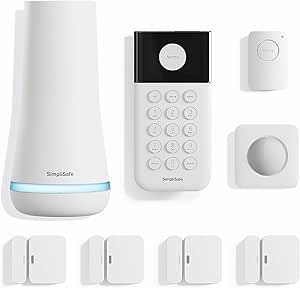 | Best for Professional Monitoring Options | Included components: Base station, keypad, four entry sensors, motion sensor, panic button | Connectivity: Wireless | Base station battery life: Up to 24 hours | VIEW ON AMAZON | See Our Full Breakdown |
| Kasa EC71 1080p Indoor Pan/Tilt Security Camera | 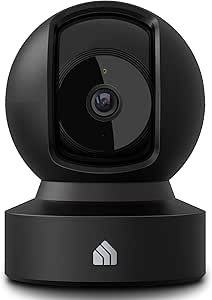 | Best for Tracking a Room | Video resolution: 1080p Full HD | Pan and tilt: 360° horizontal; 113° vertical | Night vision range: Up to 30 feet | VIEW ON AMAZON | See Our Full Breakdown |
| PGST 12-Piece Wireless Home Security System with Wi-Fi and 4G |  | Best for Backup Connectivity | Included components: Base station, keypad, 4 door/window sensors, 2 motion detectors, 2 remote controls | Connectivity: 2.4 GHz Wi-Fi and 4G | App compatibility: Smart Life and Tuya | VIEW ON AMAZON | See Our Full Breakdown |
| Wireless Smart Home Security Alarm System with 120 dB Siren |  | Best for Simple DIY Entry Alerts | Included components: 1 alarm hub, 4 door/window sensors, 1 remote control | Siren volume: 120 dB | Wi-Fi: 2.4 GHz; 5 GHz not supported | VIEW ON AMAZON | See Our Full Breakdown |
| AOQEE G5 Indoor Security Cameras, 2-Pack |  | Best Two-Camera Indoor Coverage | Camera count: 2 | Resolution: 2K HD; 3 MP sensor | Coverage: 360° pan-and-tilt with auto-tracking | VIEW ON AMAZON | See Our Full Breakdown |
| Ring Alarm 14-Piece Wireless Home Security System |  | Best for Larger Homes | Kit contents: 1 base station, 2 keypads, 8 contact sensors, 2 motion detectors, 1 range extender | Recommended home size: 2–4 bedrooms | Connectivity: Ethernet, Wi-Fi, Z-Wave, and Bluetooth | VIEW ON AMAZON | See Our Full Breakdown |
| smart home security monitoring | Connectivity |
|---|---|
| PGST 9-Piece Home Security Sys | 2.4 GHz Wi-Fi and 4G |
| PGST 22-Piece WiFi and 4G Home | 2.4 GHz Wi-Fi and 4G SIM |
| GNCC 2K Indoor Security Camera | 2.4 GHz and 5 GHz Wi-Fi, Bluetooth |
| TP-Link Tapo SolarCam C402 Kit | — |
| SimpliSafe 8-Piece Wireless Ho | Wireless |
| Kasa EC71 1080p Indoor Pan/Til | 2.4 GHz Wi-Fi |
| PGST 12-Piece Wireless Home Se | 2.4 GHz Wi-Fi and 4G |
| Wireless Smart Home Security A | — |
| AOQEE G5 Indoor Security Camer | 2.4 GHz and 5 GHz Wi-Fi; Bluetooth |
| Ring Alarm 14-Piece Wireless H | Ethernet, Wi-Fi, Z-Wave, and Bluetooth |
More Details on Our Top Picks
PGST 9-Piece Home Security System with Wi-Fi and 4G
I’d pick this kit for a home that needs entry and motion coverage across several rooms without making cameras part of the initial setup. Its four door/window sensors, two motion detectors, and two remote controls offer broader starting coverage than the more compact SimpliSafe 8-Piece Wireless Home Security System, while Wi-Fi and 4G connectivity provide an alternative connection if Wi-Fi drops. App alerts, Alexa commands, and self-adhesive installation suit a DIY setup, and there are no monthly fees listed. The tradeoff is that this is alarm-and-sensor monitoring, not a visual check-in: compatible cameras are sold separately. I’d also verify that 2.4 GHz Wi-Fi suits your network, since 5 GHz support isn’t specified. It makes more sense for sensor coverage than for buyers who want video in the box.
Pros:- Includes four entry sensors, two motion detectors, and two remote controls for multi-room coverage
- 4G backup can provide another connection if Wi-Fi is unavailable
- App alerts and control plus Alexa voice compatibility
- Expandable sensors and no monthly subscription fees listed
Cons:- Compatible cameras are purchased separately, so the kit does not provide video monitoring on its own
- Only 2.4 GHz Wi-Fi is specified
- Self-adhesive installation may not suit every surface or preferred sensor placement
Best for: DIY households that want entry and motion sensors in several rooms, 4G backup, and no listed monthly fees
Not ideal for: Buyers who want included camera footage or need a system specified for 5 GHz Wi-Fi
- Included components:Base station, keypad, four door/window sensors, two motion detectors, two remote controls
- Connectivity:2.4 GHz Wi-Fi and 4G
- Controls:App, push button, remote, and voice
- Compatibility:Alexa, Google, smartphone, tablet, personal computer
- Installation:Self-adhesive
- Expansion:Expandable sensors
- Monthly fees:None listed
- Dimensions:7 x 3.1 x 3 inches
Our verdict“Choose this PGST kit for expandable, camera-independent sensor coverage with 4G backup; choose the PGST 22-Piece system if an included camera matters more.”
PGST 22-Piece WiFi and 4G Home Security System with 2K Camera
This is the most self-contained alarm-and-video package in this group: the 22-piece kit includes a 2K camera, sensors, and an SOS remote, unlike the PGST 9-Piece Home Security System, which requires separately purchased compatible cameras for visual monitoring. App, phone, and SMS alerts give buyers several notification routes, while optional 4G connectivity can serve as a backup to 2.4 GHz Wi-Fi. The 120 dB alarm adds a local warning, and expandable accessories leave room to extend coverage. No monthly fees are listed after activation, but 4G functions require a SIM card, and local video storage requires a separately purchased microSD card. I’d favor this kit when one package matters more than network flexibility: it does not support 5 GHz Wi-Fi, and the product information doesn’t specify a professional monitoring service.
Pros:- Includes a 2K camera, sensors, and an SOS remote in one kit
- Supports app, phone, and SMS alerts
- 120 dB alarm and stated maximum range of 1000 feet
- Expandable DIY setup with no monthly fees listed after activation
Cons:- 4G functions require a SIM card
- MicroSD card for local video storage is sold separately
- Does not support 5 GHz Wi-Fi
Best for: DIY buyers who want an alarm, multiple sensors, an SOS remote, and a camera bundled together
Not ideal for: Households using only 5 GHz Wi-Fi or buyers who expect 4G backup and recorded video without separate SIM and storage purchases
- Included set:22 pieces
- Camera resolution:2K
- Connectivity:2.4 GHz Wi-Fi and 4G SIM
- Compatibility:Smart Life, Tuya, Alexa
- Alarm volume:120 dB
- Maximum range:1000 feet
- Storage support:microSD up to 256 GB; card sold separately
- Power:Battery powered
Our verdict“Choose this PGST system if you want alarm sensors and a camera in one DIY package, and can accommodate its SIM and storage requirements.”
GNCC 2K Indoor Security Camera with AI Motion Tracking
For indoor video monitoring, I’d choose this GNCC camera over the entry-sensor-focused PGST 9-Piece Home Security System. Its 340° pan and 80° tilt with AI motion tracking let one camera follow activity across a room, while 2K video and night vision up to 10 meters provide detail in dim conditions. Motion, sound, and cry detection, two-way audio, and Alexa viewing add useful ways to check in and respond. It also accepts an SD card for local 24/7 recording, unlike systems in this roundup that don’t include a camera. The limits are meaningful: the camera is indoor-only, records at 10 frames per second, and the SD card is not included. Cloud playback requires a paid subscription, so buyers seeking an alarm system with sensors should look to a full kit instead.
Pros:- 2K video with night vision up to 10 meters
- AI motion tracking with 340° horizontal and 80° vertical pan and tilt
- Two-way audio plus motion, sound, and cry detection
- Supports 24/7 SD-card recording and optional cloud storage
Cons:- SD card is not included, and cloud playback requires a paid subscription
- Indoor-only design does not cover exterior entrances
- 10 frames per second recording is less smooth than higher-frame-rate video
Best for: Households wanting a pan-and-tilt indoor camera for room monitoring, two-way communication, and optional local recording
Not ideal for: Buyers who need outdoor coverage, entry sensors, or cloud playback without a paid subscription
- Resolution:2K (1920p)
- Pan and tilt:340° horizontal and 80° vertical
- Night vision range:10 meters
- Connectivity:2.4 GHz and 5 GHz Wi-Fi, Bluetooth
- Audio:Two-way audio
- Detection:Motion, sound, and cry detection
- Storage:16–128 GB SD card (not included) or paid cloud subscription
- Frame rate:10 frames per second
- Use:Indoor
Our verdict“Choose this GNCC camera for flexible indoor video and tracking, but pair it with an alarm kit if you need door and window alerts.”
TP-Link Tapo SolarCam C402 Kit 1080p Outdoor Security Camera
The Tapo SolarCam C402 is the clearest choice here for monitoring an exterior area without running a power cable. Its solar panel and built-in battery support flexible placement, while IP65 weather resistance suits outdoor use. Compared with the indoor-only GNCC 2K camera, the Tapo adds full-color night vision, person detection, activity zones, and two-way audio for checking a driveway or yard. Local microSD storage up to 512GB also gives it a recording option without relying on cloud service. The tradeoff is that this is a camera, not a whole-home alarm kit: it does not include door sensors or a siren. Solar charging depends on direct sunlight and temperatures above 32°F, and cloud storage requires a Tapo Care subscription. Its 1080p resolution is lower than the GNCC’s 2K, but its outdoor power setup is the more relevant advantage for exterior coverage.
Pros:- Solar panel and battery support wire-free outdoor placement
- IP65 weather resistance and full-color night vision
- Person and motion detection with activity zones
- Local microSD storage supports cards up to 512GB
Cons:- Solar charging requires temperatures above 32°F and direct sunlight
- Cloud storage requires a Tapo Care subscription
- Camera-only setup does not include entry sensors or an alarm system
Best for: Homeowners who need wire-free outdoor video monitoring with solar charging and local recording
Not ideal for: Buyers who need an integrated alarm with entry sensors, or whose camera location gets little sunlight or stays below 32°F
- Resolution:1080p
- Battery life:Up to 180 days per charge
- Solar charging:45 minutes of direct sunlight provides up to one day of use
- Weather resistance:IP65
- Night vision range:Up to 30 feet
- Local storage:microSD card up to 512GB
- Cable length:13 feet
- Voice assistants:Amazon Alexa and Google Assistant
Our verdict“Choose the Tapo SolarCam for solar-assisted outdoor video and local storage, rather than for whole-home alarm coverage.”
SimpliSafe 8-Piece Wireless Home Security System
I’d shortlist the SimpliSafe 8-Piece system for buyers who want a straightforward alarm kit with the option of professional monitoring. It includes four entry sensors, a motion sensor, and a panic button, covering common entry points and giving occupants a direct way to raise an alert. App control and Alexa and Google Assistant compatibility make everyday control accessible, while wireless installation avoids wiring and drilling. Compared with the PGST 9-Piece system, SimpliSafe’s key distinction is its optional professional monitoring rather than listed 4G backup; the PGST kit, by contrast, includes two motion detectors and two remotes. SimpliSafe’s monitoring and some features require a subscription, and support is limited to the US. The base station battery is specified for up to 24 hours, so I’d check whether that backup window fits your needs. This system also lacks an included camera.
Pros:- Includes four entry sensors, a motion sensor, and a panic button
- Wireless setup avoids wiring or drilling
- App control with Alexa and Google Assistant compatibility
- Optional professional monitoring without a long-term contract
Cons:- Professional monitoring and some features require a subscription
- Products and monitoring are supported only in the US
- No camera is included, and base station battery life is up to 24 hours
Best for: US households seeking a wireless entry-and-motion alarm with optional professional monitoring and app control
Not ideal for: Buyers avoiding subscriptions, living outside the US, or wanting included cameras and specified 4G backup
- Included components:Base station, keypad, four entry sensors, motion sensor, panic button
- Connectivity:Wireless
- Base station battery life:Up to 24 hours
- Siren:100 dB
- Motion sensor range:35 feet
- Motion sensor field of view:90 degrees
- Compatibility:Smartphone, Alexa, and Google Assistant
- Warranty:1-year manufacturer limited warranty
Our verdict“Choose SimpliSafe if optional professional monitoring matters more than included video or the PGST 9-Piece system’s specified 4G backup.”
Kasa EC71 1080p Indoor Pan/Tilt Security Camera
I’d choose the Kasa EC71 when monitoring a room matters more than covering doors with an alarm system. Its 360° pan and 113° tilt with motion tracking can follow activity across a wider area than the fixed-view sensors in the PGST 12-Piece system, while baby-cry detection and two-way audio make it useful for checking on a nursery or pets. Video is 1080p, with night vision up to 30 feet. Recording can go to a microSD card without a cloud plan, though the card is sold separately; cloud storage is optional.
The tradeoff is that this is a corded indoor camera, not a whole-home alarm. It needs 2.4 GHz Wi-Fi and a nearby outlet, so it is less suitable for buyers wanting multi-room entry alerts or battery-powered placement. I’d pick the AOQEE G5 two-pack instead when two camera viewpoints and 2K video matter more than this model’s baby-cry detection.
Pros:- 360° pan and 113° tilt with motion tracking broaden room coverage.
- Baby-cry detection and two-way audio support nursery and pet monitoring.
- Local microSD recording avoids requiring a cloud subscription.
- Works with Alexa and Google Home.
Cons:- A microSD card is not included, and cloud storage is optional.
- Requires corded power and is intended for indoor use.
- Connects on 2.4 GHz Wi-Fi only.
Best for: Households that want a plug-in camera to track activity in one busy room, especially a nursery or pet area.
Not ideal for: Buyers seeking door and window alarm coverage, outdoor monitoring, or a camera that can operate away from an outlet.
- Video resolution:1080p Full HD
- Pan and tilt:360° horizontal; 113° vertical
- Night vision range:Up to 30 feet
- Detection:Motion, person, and baby-cry detection
- Audio:Two-way audio
- Storage:microSD up to 256 GB (card not included) or optional cloud storage
- Connectivity:2.4 GHz Wi-Fi
- Power:Corded electric; 5 watts
Our verdict“Choose the Kasa EC71 for tracking activity and communicating in one indoor room, but choose an alarm kit for whole-home entry protection.”
PGST 12-Piece Wireless Home Security System with Wi-Fi and 4G
The PGST 12-Piece system is the strongest fit here for buyers who want an entry alarm with a fallback connection rather than a camera-led setup. Four door and window sensors, two motion detectors, a keypad, and two remotes provide broader alarm coverage out of the box than the Wireless Smart Home Security Alarm kit, which includes four entry sensors but no motion detectors. Its Wi-Fi and 4G connectivity can help keep alerts or control available when Wi-Fi drops, subject to 4G network coverage. App control through Smart Life or Tuya, Alexa commands, and no monthly fees add flexibility.
That coverage has limits: cameras and extra sensors are sold separately, so it does not provide visual verification by itself. The listed 100-meter maximum range also does not remove the need to check placement and signal conditions in a real home. I’d favor Ring Alarm for a larger kit with two keypads and a range extender, but Ring’s cellular backup and some services require a subscription.
Pros:- Includes four entry sensors, two motion detectors, a keypad, and two remote controls.
- Wi-Fi and 4G connectivity offer a fallback path when Wi-Fi is unavailable, where coverage permits.
- App alerts and control are available through Smart Life or Tuya, with Alexa compatibility.
- No monthly fee or subscription is required for the stated system features.
Cons:- Cameras and additional sensors must be purchased separately.
- 4G backup depends on network coverage and availability.
- Uses 2.4 GHz Wi-Fi rather than 5 GHz.
Best for: Renters or homeowners who want a multi-sensor wireless alarm with app control and a 4G fallback option without monthly fees.
Not ideal for: Buyers who want included cameras, professional monitoring, or 4G backup in an area without compatible network coverage.
- Included components:Base station, keypad, 4 door/window sensors, 2 motion detectors, 2 remote controls
- Connectivity:2.4 GHz Wi-Fi and 4G
- App compatibility:Smart Life and Tuya
- Voice assistant:Alexa
- Alarm volume:110 dB
- Motion detection:PIR
- Maximum range:100 meters
- Power:Battery powered
Our verdict“Pick this PGST kit for a no-monthly-fee sensor alarm with 4G fallback, but not if you want cameras included.”
Wireless Smart Home Security Alarm System with 120 dB Siren
For a straightforward DIY alarm, this wireless hub kit supplies four door and window sensors plus a remote with a one-touch SOS button. App-based arming, disarming, event records, and alerts give it more remote-control detail than a basic siren, and Alexa and Google Home compatibility broadens its smart-home fit. Compared with the PGST 12-Piece system, this kit has a louder listed siren and supports up to 100 accessories, but PGST includes motion detectors, two remotes, and 4G connectivity.
The included hardware is best suited to a small entry-focused setup: expanding to cover more rooms means buying accessories separately. Its 2.4 GHz Wi-Fi requirement rules out 5 GHz-only networks, and the stated maximum range is 10 meters, so placement and hub-to-sensor distance matter. The rechargeable hub backup battery is useful during a power interruption, but the provided specifications do not establish cellular backup or professional monitoring.
Pros:- Includes four door and window sensors and a remote with an SOS button.
- 120 dB siren provides a strong local alarm.
- App supports remote arming, disarming, event records, and sensor alerts.
- Hub has a rechargeable backup battery and supports up to 100 accessories.
Cons:- Only four entry sensors and one remote are included; wider coverage needs extra accessories.
- Supports 2.4 GHz Wi-Fi only, not 5 GHz.
- The stated maximum range is 10 meters, limiting flexible sensor placement.
Best for: DIY households wanting a compact, app-controlled entry alarm with an SOS remote and smart assistant support.
Not ideal for: Buyers who need motion detectors in the box, 5 GHz Wi-Fi, cellular backup, or a ready-made multi-room sensor setup.
- Included components:1 alarm hub, 4 door/window sensors, 1 remote control
- Siren volume:120 dB
- Wi-Fi:2.4 GHz; 5 GHz not supported
- Wireless signal:433 MHz
- Maximum accessories:100
- Compatibility:Alexa and Google Home
- Hub backup:Rechargeable backup battery
- Maximum range:10 meters
Our verdict“Choose this kit for a small DIY entry alarm with app alerts and an SOS remote, not for broader coverage without add-on sensors.”
AOQEE G5 Indoor Security Cameras, 2-Pack
The AOQEE G5 two-pack suits buyers who need two viewpoints rather than one camera that moves between them. Each camera offers 2K video and 360° pan-and-tilt auto-tracking, with people detection, infrared night vision, and two-way audio. That makes the pair a stronger fit for monitoring separate rooms than the Kasa EC71, which offers baby-cry detection but covers only one camera location. Local TF-card storage is available without an ongoing cloud plan, though cards are not included; app sharing also helps households give others access.
These are still plug-in indoor cameras, not an alarm system with door sensors or a siren. Alexa support is limited to live streaming, so it is less integrated than a broader smart security setup, and each camera needs a power outlet. Dual-band Wi-Fi support gives it a network option the 2.4 GHz-only Kasa lacks, but the TF card format and capacity limits matter if local recording is the plan.
Pros:- Two cameras let buyers monitor separate rooms at once.
- 2K video, 360° auto-tracking, and people detection support detailed indoor monitoring.
- Local TF-card storage is available alongside optional cloud storage.
- Includes power cords and supports self-standing, wall, or ceiling mounting.
Cons:- TF cards are not included, and local cards are limited to 8–128 GB in FAT32 format.
- Both cameras require power outlets and are intended for indoor use.
- Alexa compatibility is limited to live streaming.
Best for: Households that want two indoor camera viewpoints with higher-resolution video and local recording options.
Not ideal for: Buyers who need battery-powered or outdoor cameras, door/window alarms, or Alexa controls beyond live streaming.
- Camera count:2
- Resolution:2K HD; 3 MP sensor
- Coverage:360° pan-and-tilt with auto-tracking
- Connectivity:2.4 GHz and 5 GHz Wi-Fi; Bluetooth
- Detection and alerts:Motion alerts with people detection
- Audio:Two-way audio
- Storage:Optional cloud or local TF card, 8–128 GB, FAT32; card not included
- Power:Plug-in; includes 6.6 ft power cord
Our verdict“Choose the AOQEE G5 pair for two plug-in indoor camera views, but look elsewhere for an alarm system or fuller Alexa control.”
Ring Alarm 14-Piece Wireless Home Security System
The Ring Alarm 14-piece kit is the most ready-to-deploy choice here for a multi-room alarm: eight contact sensors, two motion detectors, two keypads, and a range extender give it more included entry coverage and control points than the PGST 12-Piece system. App alerts and Alexa control make day-to-day arming straightforward, while the 24-hour base-station battery backup helps keep the hub running through a power outage. The kit is recommended for two- to four-bedroom homes and can be expanded with additional sensors and accessories.
Its main compromise is dependence on paid services for some monitoring features: professional monitoring and cellular backup require a compatible subscription, and service availability or added fees can vary by location. That makes PGST a better match for buyers prioritizing no monthly fees and included 4G connectivity, though PGST’s kit has fewer included sensors and keypads. I’d choose Ring for a larger, expandable sensor setup, not for buyers who want every backup and monitoring feature without a subscription.
Pros:- Includes eight contact sensors, two motion detectors, and two keypads for multi-room use.
- Range extender and expandability support broader sensor placement.
- App alerts and Alexa voice control provide convenient system management.
- Base station includes a 24-hour battery backup.
Cons:- Professional monitoring and cellular backup require a compatible subscription.
- Some features and services may have location restrictions or additional fees.
- The stated warranty is limited to one year.
Best for: Households in two- to four-bedroom homes that want a substantial sensor kit, two keypads, and room to expand.
Not ideal for: Buyers who want professional monitoring or cellular backup without a subscription, or who need to confirm service availability across regions.
- Kit contents:1 base station, 2 keypads, 8 contact sensors, 2 motion detectors, 1 range extender
- Recommended home size:2–4 bedrooms
- Connectivity:Ethernet, Wi-Fi, Z-Wave, and Bluetooth
- Cellular backup:Available with subscription
- Base-station battery backup:24 hours
- Base-station power:100–240V, 50/60Hz; AC adapter included
- Base-station dimensions:6.65 × 6.65 × 1.46 inches
- Warranty:1-year limited warranty
Our verdict“Choose Ring Alarm for a well-equipped, expandable multi-room kit if you accept subscription requirements for professional monitoring and cellular backup.”

How We Picked
I ranked these options by how well each one supports practical home monitoring: the kind of coverage it offers, how clearly its devices work together, and how much effort it takes to install and maintain. For alarm kits, I weighed sensor breadth, connectivity options, and whether the bundle appears suited to a small setup or a home with several entry points. For cameras, I focused on the role each model fills, such as indoor monitoring, pan-and-tilt viewing, motion tracking, or outdoor coverage with solar power.
The order reflects fit across common household needs, not device count alone. SimpliSafe ranks highest as a balanced alarm package; Ring follows for buyers who want a larger coordinated kit, while PGST’s larger bundles serve homes that need more sensors and Wi-Fi/4G options. Focused cameras rank below full alarm systems for whole-home entry monitoring, but can be a better match for a single room or outdoor view. I also considered the tradeoffs buyers should check before choosing, including setup demands, network dependence, and the difference between local alerts and any optional monitoring service.
Factors to Consider When Choosing Smart Home Security Monitoring
Choosing smart home security monitoring starts with the risks and routines you want the system to cover, not the longest feature list. These factors help separate an alarm package from a camera-first approach and prevent gaps between devices, connectivity, and response expectations.
Decide Whether You Need an Alarm, Cameras, or Both
An alarm kit monitors entry points and can make a loud local alert, while a camera gives you visual context about activity in a particular area. Those functions complement each other but are not interchangeable: a camera aimed at a hallway may miss a side door, and a door sensor cannot show who entered. Start by listing the locations you want covered, then decide whether you need alerts, video, or both at each one. A common mistake is buying a camera bundle and assuming it provides the same entry-point coverage as a sensor-based system. If you want one connected plan, check that the devices and app support the way you intend to use them.
Map Entry Points Before Choosing a Kit Size
Count the doors and accessible windows you want to monitor, then account for rooms where a motion detector or camera would add useful coverage. A larger package, such as a 14- or 22-piece kit, may cover more locations from the start, but only if its included components match your floor plan. Extra sensors left unused do not improve protection, and buying too small can leave an important entrance unmonitored. Think about how occupants, pets, and frequent visitors move through the home so alerts remain useful rather than constant. For a small apartment, a compact system may be easier to manage; a multi-entry home may benefit from a broader bundle.
Check What Happens When Internet Service Fails
Wi-Fi-dependent devices can lose remote access when the router or broadband connection goes down, so understand which functions continue locally and which stop working. Some PGST alarm kits list Wi-Fi and 4G connectivity, which may offer an alternate communication path, but buyers should verify how that connection is activated and whether it needs a compatible plan. Ask whether the system can still sound a local siren without an internet connection and whether notifications reach your phone during an outage. A backup connection is only useful if it is available where the system is installed. Do not treat a connectivity label as a guarantee of uninterrupted monitoring.
Separate Self-Monitoring From Professional Response
A system that sends app alerts may require you to notice the notification and decide what to do next. Professional monitoring, when offered, can involve separate service terms and ongoing charges, so check availability, cancellation rules, and what happens when an alarm is triggered. Local sirens can alert people nearby, but they do not automatically dispatch help. Decide who will receive alerts, whether they can respond promptly, and what backup contact should be listed. Buyers who travel often may value a different response arrangement from someone who is usually at home. Compare the response workflow, not just the alarm hardware.
Plan Camera Placement, Privacy, and Lighting
Indoor cameras are most useful when they cover a clear approach or shared area without recording places where household members expect privacy. Pan-and-tilt and motion-tracking functions can follow activity, but they do not remove blind spots caused by furniture, glare, or poor placement. Outdoor cameras face additional challenges: weather exposure, night lighting, mounting height, and a usable Wi-Fi signal all affect whether footage is useful. Solar power can reduce charging chores, but the panel still needs suitable light and a mounting position that works for both the camera view and power supply. Before installation, decide which areas should trigger alerts and how to manage recordings.
Factor In Setup and Ongoing Maintenance
Device count affects more than initial installation: each sensor or camera needs a suitable location, power, network access, and occasional attention. Battery-powered devices require a plan for checking charge levels, while solar-assisted equipment depends on placement and seasonal sunlight. A kit that looks simple on paper can become cumbersome if household members have to manage several apps or repeated false alerts. Consider who will install the equipment and who will maintain it after the first week. Paying for a larger bundle makes sense when it maps cleanly to your layout; otherwise, a smaller system plus one well-placed camera may be easier to live with.
Frequently Asked Questions
Should I choose a complete alarm kit or buy separate security cameras?
Choose an alarm kit if your priority is monitoring doors and windows with coordinated sensors and a central alarm. Separate cameras make more sense when you mainly need to check a room, watch a pet, or cover one outdoor approach. A camera can show what happened, but it may not sound an entry alarm or cover every access point. If you need both functions, check whether the alarm and cameras can be managed together or whether you will use separate apps. Match the purchase to the gaps in your current setup rather than duplicating coverage.
Is Wi-Fi and 4G connectivity useful for a home alarm?
It can be useful if you want an alternate communication route when the home internet connection is unavailable. Before relying on it, check whether 4G requires a separate SIM, service plan, or activation step, and confirm that coverage is available at the installation address. Ask which alerts and remote functions remain available during an outage, since backup connectivity may not preserve every feature. A local siren can still matter even when phone notifications fail. Treat 4G as a potential resilience feature, not a substitute for checking the system’s outage behavior.
Can indoor security cameras replace door and window sensors?
No, they cover different parts of a security plan. A camera may provide video of a room or entrance, but its view can be blocked, and it may not register an opening outside its field of view. Door and window sensors can report that an entry point has opened without showing who was there. For a home where entry alerts are the priority, sensors are usually the more direct tool. Cameras can add visual context in selected areas, but placement and privacy limits make them an incomplete replacement for perimeter coverage.
How many security devices should I start with?
Begin with the entry points and rooms that matter most, rather than choosing a kit by its piece count alone. A smaller home may need a modest set of door or window sensors and one camera, while a larger layout can call for more sensors and multiple views. Check exactly what counts as a piece, since bundles can include accessories as well as monitoring devices. Leave room to expand if your first installation reveals a blind spot. A well-placed, manageable setup is more useful than a large bundle that is difficult to maintain.
What should I check before relying on solar power for an outdoor camera?
Confirm that the mounting location receives enough sunlight for the solar panel and still provides the camera angle you need. Trees, roof overhangs, seasonal daylight, and the direction of the panel can affect charging, so do not assume every exterior wall will work equally well. Check the camera’s weather suitability and how it behaves if the battery charge falls. A solar kit can reduce routine charging, but it does not remove the need to inspect power status. If the location is shaded, plan for a different power arrangement or a camera placement with better exposure.
Conclusion
Best overall: I’d start with the SimpliSafe 8-Piece Wireless Home Security System for a balanced alarm-focused setup. Best value: the PGST 9-Piece System is the more compact option for buyers who want Wi-Fi and 4G connectivity without a large device bundle. Best premium-style coverage: Ring Alarm’s 14-Piece System suits households that want a broader coordinated kit, while the 22-piece PGST package is a fit for buyers who need many components and are ready to manage them. Best for beginners: Kasa EC71 offers a focused indoor camera role without asking a new buyer to plan an entire sensor network. Best for specific needs: choose Tapo SolarCam for an outdoor view with solar-assisted power, GNCC for indoor motion tracking, or AOQEE’s two-camera pack when monitoring more than one indoor area matters. I’d choose the system that covers your actual entry points and fits your connectivity and maintenance routine, rather than the one with the most devices.