
TL;DR

Get home appliances delivered free with Prime
- Fast, free delivery on millions of items
- Prime Video, Amazon Music and more included
- Member-only deals all year
A Matter Alpha how-to report describes adding a Govee COB Strip Light 2 Pro to IKEA’s YXSTABY gaming side table without drilling or permanent changes. Small 3D-printed fixtures fit existing screw holes, while Matter enables basic controls through compatible smart-home platforms.
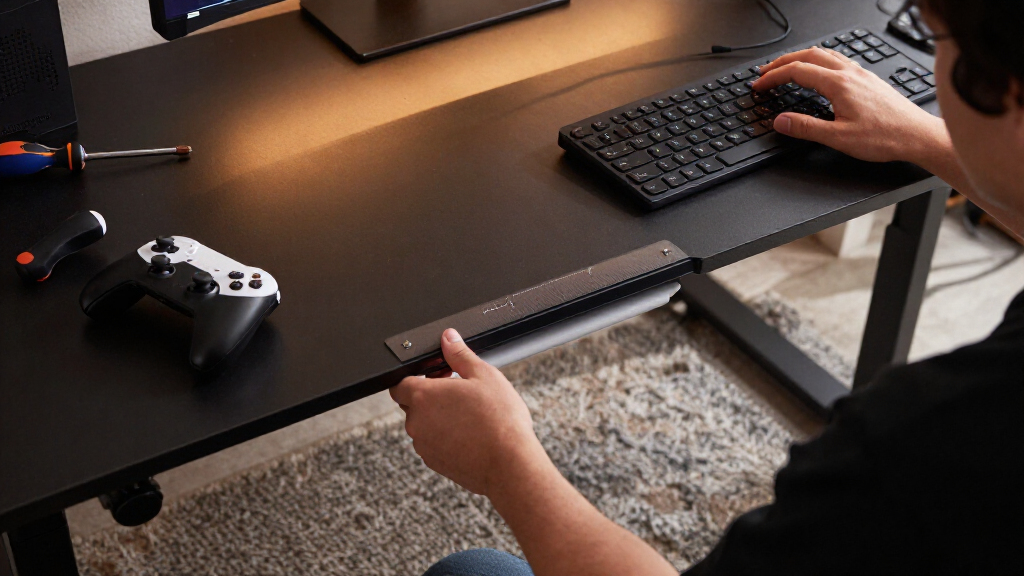
A Matter Alpha how-to report describes adding a Govee COB Strip Light 2 Pro inside IKEA’s YXSTABY gaming side table without drilling or permanently altering the furniture. The setup uses small 3D-printed fixtures fitted into existing screw holes, and connects the lights to a Matter-compatible smart-home platform for basic controls such as brightness and color.
The project addresses a practical limitation of the table: its enclosed storage area can be dark. The report’s author says the strip creates ambient lighting inside the furniture, while the use of existing mounting holes avoids adding new ones. The guide calls the task easy to moderate and says it does not require soldering, but it does require access to a 3D printer and careful assembly.
The author designed two fixture types, with four upper and four lower pieces used to hold the light strip. The files are available on MakerWorld, according to the report. The author printed the fixtures in translucent PETG and says PLA may also work, although the fit could vary. The fixtures are pushed into existing holes and are intended to stay in place without extra screws or glue.
The guide recommends placing the light strip around the table’s inner sections, avoiding tight bends, and trimming it only at the manufacturer’s marked cutting points. The strip’s power cable is routed through an opening in the bottom panel. After installation, the user can pair the light with a compatible platform such as Apple Home, Home Assistant or SmartThings. The report says Matter provides basic controls, while more advanced animated effects remain available in Govee’s app.
Lighting Without Altering the Table
The project shows one way to add smart lighting to furniture without drilling, an approach that may appeal to owners who want to keep a product intact or avoid permanent changes to a rented or shared space. The fixtures use existing holes, so the method depends on the table’s construction and the fit of the printed parts rather than adhesive on the furniture.
It also illustrates a distinction between Matter compatibility and full feature access. According to the report, a Matter platform can handle core controls, but some effects require Govee’s own app. Readers considering the setup should not assume every feature will appear in their preferred smart-home interface.
Products Worth Considering

Philips Hue Bridge Pro Smart Lighting Hub

Hisense 75U6SF Pro 75-Inch U6 Pro Mini-LED 4K UHD Smart Fire TV

TCL 75-Inch QM6K QLED Mini LED 4K HDR Smart Google TV, 144Hz
As an affiliate, we earn on qualifying purchases.
How the YXSTABY Setup Works
IKEA’s YXSTABY collection was developed with Xbox, according to the source report, and includes furniture intended for gaming spaces. The guide focuses on the gaming side table, whose enclosed storage area can hold controllers and other accessories. It proposes placing a COB light strip inside that space rather than attaching a conventional strip directly to the furniture.
The author chose COB lighting because it produces a more continuous-looking glow than strips with clearly visible individual LEDs, and supports multicolor effects. The report also notes a fitting challenge: the strip is relatively thick and elastic, and its adhesive may not suit every surface. The printed fixtures provide an alternative way to hold it. The setup works best while the table is being assembled, though the guide says installation remains possible afterward with more effort to access the mounting points.
““without drilling extra holes or making permanent changes to the furniture””
— Matter Alpha report
Fit and Feature Limits
The report describes one author’s installation and does not provide independent testing of the fixtures, long-term durability or fit across different printers and materials. It says PLA can work but that the fit may vary; the suggested tissue shim for a loose fixture is a workaround rather than a tested universal solution.
The source also does not specify the finished strip length, the amount of light produced, or whether every Matter-compatible platform exposes the same controls. It says advanced effects are available in Govee’s app, but does not list which specific animations can or cannot be controlled through Matter. The supplied source ends while describing an AI-generated effect, so the author’s final lighting customization is not fully available.
Pairing and Final Assembly
For anyone following the guide, the next steps are to complete the table assembly, route the power cable through the bottom-panel opening, and connect the strip to a Matter-compatible platform. The report advises recalibrating the strip’s length in the Govee Home app after cutting it, so lighting effects match the installed section.
Readers should check the MakerWorld files and the IKEA assembly instructions before printing or installing the fixtures. The report does not announce a product release or a broader IKEA update; its next practical milestone is the user’s own installation and confirmation that the printed mounts, cut length and chosen smart-home controls work together.
Key Questions
Does the YXSTABY lighting project require drilling?
No. The report says the printed fixtures fit into existing screw holes, so the installation does not call for drilling new holes or permanently modifying the table.
What lighting strip does the guide use?
It uses the Govee COB Strip Light 2 Pro. The report says COB lighting gives a more continuous glow and supports multicolor effects.
What equipment is needed besides the table and light strip?
The project calls for a 3D printer and filament to make the fixtures, plus a Matter-compatible smart-home platform for basic controls. The report says PETG was used and PLA may also work, though fit can differ.
Can the lights be controlled through Matter?
According to the report, Matter supports basic functions including power, brightness and color through compatible platforms such as Apple Home, Home Assistant or SmartThings. More advanced effects may require the Govee Home app.
What should users know before cutting the light strip?
The guide says to disconnect power and cut only at the strip’s marked cutting points. It also says the removed section cannot be reconnected and recommends recalibrating the strip length in the Govee app afterward.
Source: matteralpha.com