TL;DR

Get home appliances delivered free with Prime
- Fast, free delivery on millions of items
- Prime Video, Amazon Music and more included
- Member-only deals all year
Smart home security cameras let you check on your home, receive alerts, and review footage, but they do not guarantee that an incident will be stopped. Choose a camera for its location, detection needs, power, connection, storage costs, and privacy controls; then test its view and alerts before relying on it.
Your phone buzzes while you’re across town: a package has landed on the porch, and the camera shows a delivery driver stepping back toward the sidewalk. That quick look can be useful. It can also reveal how much a camera depends on its view, connection, settings, and the person watching the alert.
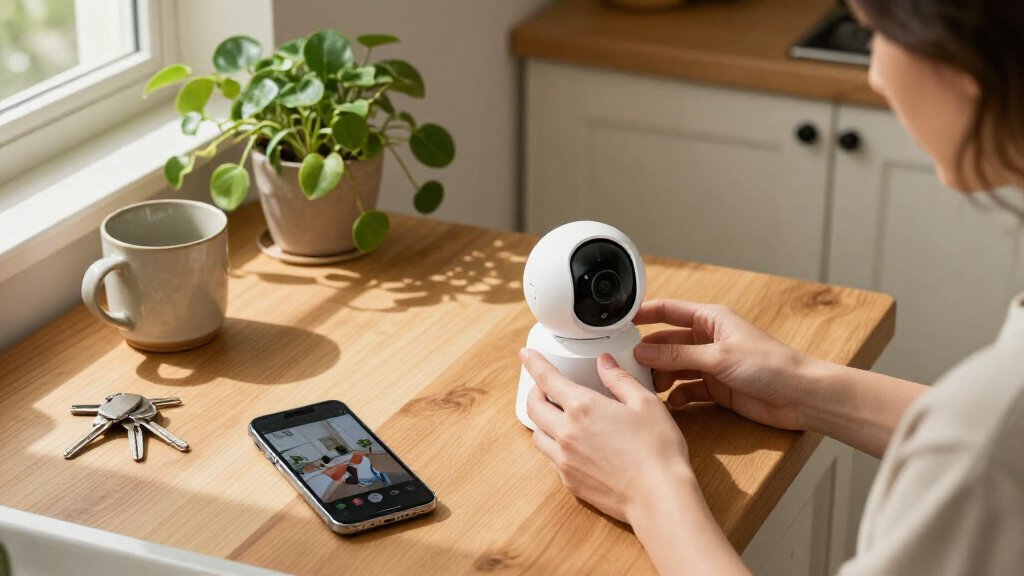
Smart home security cameras let people check on their homes remotely, receive alerts about activity, and review recorded footage. They range from simple indoor cameras to weatherproof outdoor models with lights, sirens, pan-and-tilt controls, or doorbell functions. In this guide, you’ll learn how to match a camera to a real need, compare storage and power options, and set it up with privacy in mind.
The key distinction is simple: a camera provides monitoring and documentation, not a promise that an incident will be prevented or help will arrive. Think of it as a window with a notification bell attached. It can give you useful information, but your doors, lighting, household plan, and response still matter.
Match the camera’s location, view, weather rating, and night vision to one specific monitoring need.
Use detection categories and activity zones to reduce irrelevant alerts, then test them at different times of day.
Compare cloud, local, and combined storage by retention, subscription costs, and what happens if the device or internet fails.
Check power and Wi-Fi at the mounting spot before installation; battery upkeep depends on activity, settings, signal, and conditions.
Use unique account credentials, two-factor authentication where available, careful camera angles, and clear household privacy expectations.
Choose a camera for the job you need it to do
A smart home security camera is a connected device that captures video and can send you live views, activity alerts, or recorded clips. The right model depends on where you’ll place it and what you want to see: a hallway, front step, garage, or backyard each calls for a different view and design.
Start with one specific problem. If you want to see whether the dog is sleeping or chewing a cushion, a simple indoor camera may be enough. If you want to check the side gate after dark, an outdoor model with suitable weather protection and night vision makes more sense. A camera facing a front door might benefit from a clear view of visitors and packages, while a wide backyard view may trade detail at a distance for broader coverage.
Resolution is only one part of that choice. A wider field of view works like a wide-angle photograph: it captures more of the scene, but a person far down the driveway can appear small. That means a camera can show that something happened without showing enough detail to identify what happened. Lighting and angle also shape what the camera records. For instance, a camera pointed straight into a bright setting sun may show a dark silhouette instead of useful details.
Before you buy, write down the camera’s intended job, where it will sit, and whether it needs to see at night. Then compare indoor or outdoor ratings, field of view, resolution, and night vision against that job. A camera that covers the right area clearly can serve you better than a higher-resolution camera aimed at the wrong spot, because useful evidence depends on what falls within the frame and how clearly it appears.
Products Worth Considering

Philips Hue White and Color Ambiance A19 Smart Bulb Starter Kit, 2-Pack

Blueair Signature SP1i Smart Air Purifier

LG 75-Inch QNED73B Mini LED 4K Smart TV (2026)
As an affiliate, we earn on qualifying purchases.
Get alerts you can act on instead of a phone full of noise
Smart home security camera alerts help most when they tell you about an event you care about and leave out routine movement. Person, pet, vehicle, and package detection can sort activity into categories, while activity zones can limit alerts to selected parts of the image. These tools reduce distraction, but their accuracy depends on placement, lighting, weather, and the camera’s software. An alert that fires too often is easy to ignore; one that misses a meaningful event can create false confidence.
Imagine a camera facing a porch that also shows a busy sidewalk. Without a zone, every passing pedestrian might trigger a notification. By drawing a zone around the steps and package drop-off area, you can focus alerts on movement near the door. If a tree branch waves in the wind just inside that zone, though, the camera may still mistake it for meaningful activity. Narrower zones can cut noise, but may also exclude part of the approach you hoped to monitor.
Set detection to match your routine and adjust it over several days. If your phone lights up every time the neighbor’s cat crosses the lawn, narrow the zone or change pet detection. If deliveries often go unnoticed, check whether package detection is available and whether your camera angle shows the landing area. Some models offer descriptions or familiar-person features, but availability and accuracy vary; treat labels as clues to check, not certain identification. Detection features are useful filters, not a substitute for reviewing the actual image.
Test alerts while you are home. Walk through the camera’s view at different times of day, then compare what it catches with what matters to you. Useful alerts should prompt a clear next step, such as checking a live view or asking a household member to bring in a parcel. No notification system can guarantee that you’ll see an alert or respond in time, so decide which events warrant action and who can respond when you are unavailable.
Compare storage costs before you commit to a camera
Camera footage usually goes to cloud storage, local storage, or a combination of the two. Cloud storage can keep recordings away from the camera, so a stolen or damaged device may not take the footage with it. In return, cloud features can depend on provider terms, account security, and internet access, and may carry a recurring fee. Local storage can give you more direct control and may avoid a recurring fee, but a memory card or hub can be damaged or stolen along with the camera.
| Storage choice | What it can offer | What to check |
|---|---|---|
| Cloud | Off-site clips and access through an app | Subscription price, retention period, and account protections |
| Local | Recordings on a memory card or hub, often without a cloud plan | Storage capacity, device damage or theft, and supported features |
| Both | A local copy plus some cloud access | Whether both options work at once and what features still cost extra |
Read the model’s feature list carefully before buying. A low-cost camera might include live viewing but charge for saved clips, longer history, or advanced detection. Another may record to a memory card without a monthly plan. The tradeoff can affect more than price: if you only need a live check, paying for long-term history may add little value, while a household that expects to review an event days later needs to know whether clips will still exist. Compare the total expense across the time you expect to keep it, not just the price on the box.
For example, a renter who wants occasional live checks on a cat may not need months of stored clips. A homeowner who wants to review an event after returning from a trip may value recording history and off-site copies. Check how long footage stays available, whether continuous recording is supported, and whether the camera can still save locally during an internet outage. Your storage choice should fit what you’d actually need to retrieve, not a feature list you’ll never use.
Place cameras where the picture, power, and signal all work
A camera only helps when it has a useful view, steady power, and a reliable connection. Pick a position that covers the intended entrance or space without aiming into a neighbor’s private area. Then check that the image is not washed out by a window, porch light, or setting sun. A small angle change can turn a glowing patch of glass into a clear view of the front step; a poor angle can leave you with recordings that show motion but little usable detail.
Power shapes where you can install the camera and how often you will need to maintain it. Wired models avoid battery charging but need a suitable power source, which can limit placement or make installation more involved. Battery models are easier to place, though frequent motion alerts, live viewing, weak Wi-Fi, or cold weather can shorten the time between charges. Solar accessories may reduce charging in a sunny location, but depend on suitable exposure and do not make every placement maintenance-free. The convenient spot is worthwhile only if it can stay powered reliably.
Check the Wi-Fi signal at the exact mounting spot before you secure the camera. A phone showing a weak connection in the same corner is a hint that video and alerts may struggle there too. A camera that frequently disconnects can leave gaps in footage or delay notifications, undermining the reason you installed it. If your camera records locally, find out whether it can continue during an internet outage; remote viewing and cloud alerts commonly depend on both power and connectivity.
Use this quick setup sequence:
- Choose the area you need to monitor and a privacy-respecting angle.
- Check the power source, weather rating, and Wi-Fi signal at that spot.
- Mount the camera temporarily and review the picture in daylight and darkness.
- Test alerts and recording, then adjust zones and sensitivity.
For example, a camera above a garage might capture the driveway in daylight but lose detail when a headlight points toward it at night. A short test before final mounting can catch that problem while the camera is still easy to move. It also lets you confirm the camera reaches the area you intended without needlessly recording nearby spaces.
Protect privacy while keeping the features you value
Camera privacy depends on who can access footage, what the device records, and where its video goes. Look for a unique account password, two-factor authentication, secure software updates, and clear controls for deleting or sharing clips. These steps lower avoidable account risks, although no connected device can promise perfect security. Access controls matter because a camera may capture routine household activity over time, not just the incident that prompted you to install it.
Think through the camera’s view before you turn it on. A living-room camera may capture a visitor or household member in a private moment; an outdoor camera may sweep across a neighbor’s window or a shared walkway. Aim it toward the area you need, use privacy zones when available, and tell household members and visitors when appropriate. Audio recording can raise additional legal and privacy concerns, and local rules vary. Limiting the frame can reduce unnecessary exposure while still preserving the view you need.
Consider whether you need cloud access, local recording, or both. Local storage may reduce reliance on a cloud provider, while cloud storage can keep footage off-site if the camera is stolen. Check the account-sharing settings too. If a former roommate or family member once had access, remove their account or change permissions rather than assuming a new password will handle every shared-device setting. Storage and sharing choices determine who can review footage and how long private moments may remain available.
Suppose you use a camera to check on a child or pet while you’re away. Set a clear purpose, choose a view that avoids unnecessary private spaces, and let other household members know how to pause or access it. Good security includes respect for the people in the frame, not just keeping strangers out of the app.
Use cameras as one layer of home security, not the whole plan
A camera can help you see an event, save a record, or notice activity, but it cannot guarantee that anyone will stop an intruder. Its practical value comes from how it fits with other parts of your household plan, including secure doors and windows, useful exterior lighting, reliable alerts, and a clear response. Monitoring is information; protection also depends on what happens around it. This distinction matters when deciding what to spend on: clearer footage can help explain an event afterward, while physical barriers and lighting can change what happens at the property.
For example, a camera may record someone approaching a side gate after dark. A motion light might make the path easier to see and less inviting, while a locked gate adds a physical barrier. If the camera sends an alert while you’re driving or asleep, you may not see it right away. Decide in advance what you’ll do with an alert and who else can check it when you’re unavailable. A plan turns a notification into a possible response; without one, the camera may simply document an event after it is over.
Compatibility matters if you already use a voice assistant or smart-home system. A camera may support one platform but not another, or may show a live feed without passing along every type of alert. Confirm the specific functions you need before purchasing, since a feature listed as compatible may not include the notification or automation you expect. Also check what happens when the internet, router, power, or cloud service goes down; a feature that depends on a live connection may stop even when the camera is physically intact.
Some households need a doorbell view; others mainly want to check on a pet or watch a garage entrance. Keep your setup focused on those needs and review it when your routine changes. Use the camera to improve awareness, then pair it with practical steps that still work when your phone is face down on the kitchen counter.
Frequently Asked Questions
Do smart home security cameras need Wi-Fi or internet?
Wi-Fi commonly supports app access and remote alerts. Some models can record locally during an internet outage, but remote viewing and cloud features may stop; check the specific camera’s offline behavior.
Do I need to pay a monthly subscription?
Not always. Some cameras offer basic alerts or local recording without a plan, while saved cloud clips, longer retention, or advanced detection may require a subscription. Compare the exact features and ongoing cost before you buy.
Is local storage better than cloud storage?
Local storage can offer direct control and avoid recurring cloud fees, but the camera or storage card could be damaged or stolen. Cloud storage keeps footage off-site, though it depends on the provider, internet access, account security, and subscription terms.
Can smart cameras be hacked?
Connected devices can face security risks. Use a unique password, enable two-factor authentication when available, secure your router, and install camera software updates to reduce avoidable risks.
Can I use an indoor camera outside?
Usually, no. Indoor cameras may lack protection against rain, dust, and temperature changes. Choose an outdoor-rated model designed for the weather conditions at its mounting location.
What happens if the power or internet goes out?
A camera without backup power may stop operating. A model with local storage may keep recording during an internet outage, but remote access and notifications usually depend on power and connectivity.
Conclusion
Choose a camera by starting with the moment you want it to help you understand: a package at the door, movement by the garage, or a pet waiting at home. Match the view, power, alerts, storage, and privacy controls to that moment, then test the setup before depending on it.
A camera can give you a clearer window into your home. Pair that view with sound locks, sensible lighting, and a plan for what you’ll do when the phone buzzes.