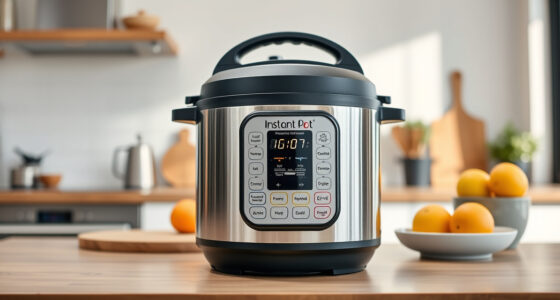
If your Instant Pot displays a Burn error, it can be frustrating and disruptive to your cooking. This error typically occurs when the appliance detects that the bottom of the inner pot is overheating or when there’s a blockage preventing pressure buildup. Fortunately, most Burn errors are fixable with simple troubleshooting steps.
Understanding the common causes and knowing how to address them can save you time and ensure your cooking proceeds smoothly. This guide provides clear, safe instructions to identify and resolve Burn errors on your Instant Pot 4QT RIO Mini 7-in-1 Multi-Cooker.
Key Takeaways
| Common Causes | Food sticking or burning at the bottom, improper sealing, or blockage. |
| Quick Fixes | Check for food debris, ensure proper sealing, and release pressure. |
| Preventative Tips | Use enough liquid, avoid overfilling, and stir ingredients. |
| Safety First | Always unplug before cleaning or inspecting the lid and sealing ring. |

Instant Pot 4QT RIO Mini 7-in-1 Multi-Cooker, Pressure Cooker, Slow cook, Sauté, Steam, Rice Maker, Yogurt, & Warmer, Black, 4 Quarts
- 7-in-1 Multi-Cooker Functions: Pressure, slow, sauté, steam, rice, yogurt, warm
- Compact and Space-Saving: Mini size with same cooking surface as an 8-inch pan
- Ideal for Small Meals: 4-quart capacity for up to 4 servings
As an affiliate, we earn on qualifying purchases.
Step 1: Turn Off and Release Pressure
- Press the ‘Cancel’ button to turn off the Instant Pot.
- Allow the pressure to release naturally for 10-15 minutes, or use the quick-release method if safe to do so.

AOZITA Steamer Basket for Instant Pot Accessories 6 qt or 8 quart - 2 Tier Stackable 18/8 Stainless Steel Mesh - Silicone Handle - Vegetable Steamer Insert, Egg Basket, Pasta Strainer,Silver
- Two-Tier Stackable Design: Cook multiple foods simultaneously
- Versatile Instant Pot Accessory: Steams, strains, and cooks various foods
- High-Quality Stainless Steel: Durable, dishwasher safe construction
As an affiliate, we earn on qualifying purchases.
Step 2: Open the Lid and Inspect
Carefully open the lid once the pressure has fully released. Check the inner pot for food residue, stuck bits, or burned material at the bottom.
Step 3: Clean the Inner Pot and Sealing Ring
- Wash the inner pot thoroughly with warm, soapy water.
- Remove and inspect the sealing ring (use the recommended replacement if damaged or odor persists).
Step 4: Check for Blockages and Proper Seating
- Ensure the silicone sealing ring is properly fitted and not deformed.
- Inspect the float valve and steam release vent for food debris or blockages.
Step 5: Restart with Correct Settings
Reassemble the lid, ensure it’s properly sealed, add enough liquid as per recipe, and select the appropriate cooking function. Monitor closely during initial minutes.
The Products in This Guide

Instant Pot 4QT RIO Mini 7-in-1 Multi-Cooker
- ✔ Color: Rosewater
- ✔ Dimensions: 11.5 x 9.4 x 11 inches
- ✔ Warranty: 1-year limited

AOZITA Steamer Basket
- ✔ Capacity: Stackable 2-tier
- ✔ Material: Stainless Steel
- ✔ Color: Silver
Instant Pot 4QT RIO Mini 7-in-1 Multi-Cooker
The Instant Pot 4QT RIO Mini is a compact, 7-in-1 appliance suitable for small families or individual users. Its anti-spin design and modern aesthetic make it a practical addition to any kitchen. When used correctly, it can cook meals faster and more efficiently.
Pros:
- 7-in-1 multi-functionality
- Compact size for small spaces
- Easy to clean and operate
- Modern design with colorful finish
Cons:
- Limited capacity for large families
- Burn errors can occur if not used properly
Best for: Small households, quick meals, space-saving kitchens
Not ideal for: Cooking for large groups or batch cooking
Bottom line: A versatile, space-saving cooker ideal for small meals and quick preparation.
AOZITA Steamer Basket
The AOZITA Steamer Basket adds versatility to your Instant Pot, allowing you to steam vegetables, eggs, and more efficiently. Its 2-tier, stackable design maximizes space and cooking options.
Pros:
- Two-tier stacking for multiple foods
- Durable stainless steel
- Easy to clean
- Fits multiple pot sizes
Cons:
- Adds to cleaning routine
- Requires additional space in the pot
Best for: Steaming vegetables, eggs, and seafood simultaneously
Not ideal for: Use as a replacement for the inner pot
Bottom line: A versatile accessory that makes steaming multiple foods easier and more efficient.
Frequently Asked Questions
Why does my Instant Pot show a Burn error?
It usually occurs when food sticks or burns at the bottom, the sealing isn’t tight, or there’s a blockage in the vent or float valve.
How can I prevent the Burn error?
Ensure there is enough liquid, avoid overfilling the inner pot, stir ingredients well, and check that the sealing ring and vent are clean and properly fitted.
Is it safe to continue cooking after a Burn error?
No, it’s best to turn off and unplug the Instant Pot, let it cool, clean the components, and address the cause before restarting.
What should I do if the Burn error persists?
Repeat the cleaning process, check for food debris, and verify all parts are correctly assembled. If unresolved, consider replacing the sealing ring or float valve.
Mastering Your Instant Pot for Smooth Cooking
While Burn errors can be concerning, understanding their causes and following proper troubleshooting steps can help you resolve issues quickly and safely. Regular maintenance, correct sealing, and proper ingredient preparation are key to avoiding these errors in the future. With a little care, your Instant Pot will continue to serve up delicious meals efficiently and reliably.
Affiliate disclosure: As an Amazon Associate we earn from qualifying purchases. Prices and availability are accurate as of the time of publishing.