Having trouble with your KitchenAid Artisan Series 5 Quart Tilt Head Stand Mixer not tilting back can be frustrating, especially when you’re in the middle of baking. This common issue usually stems from a mechanical or alignment problem that can often be fixed at home with some basic steps. Understanding the mixer’s tilt mechanism and following careful troubleshooting can save you time and avoid costly repairs.

Get home appliances delivered free with Prime
- Fast, free delivery on millions of items
- Prime Video, Amazon Music and more included
- Member-only deals all year
In this guide, we’ll walk through practical, safe steps to identify and resolve why your mixer won’t tilt back. Whether it’s a stuck hinge, debris buildup, or a simple misalignment, these instructions will help you get your mixer functioning smoothly again.
Key Takeaways
| Identify the cause | Stuck hinge, debris, or misalignment are common causes. |
| Safety first | Always unplug before attempting repairs. |
| Regular maintenance | Keep the hinge and tilt mechanism clean and lubricated. |
| Step-by-step fix | Follow precise instructions to avoid damage. |
| Professional help | Seek expert repair if unsure or issue persists. |
Ensure Safety and Prepare Your Workspace
- Unplug your KitchenAid mixer from the power outlet to prevent accidental activation during repairs.
- Move the mixer to a clear, stable workspace with good lighting.
- Gather necessary tools: a screwdriver, soft cloth, mild soap, and possibly a small lubricant such as food-grade silicone spray.
Inspect the Tilt Head and Hinge Area
- Lift the tilt head slightly to observe the hinge mechanism. If it feels stiff or stuck, check for visible debris, dried food, or buildup around the hinge.
- Gently wipe the hinge and surrounding areas with a damp cloth. Avoid forcing the tilt head if resistance is encountered.
- If dirt is stubborn, use a small brush or soft cloth with mild soap to clean the hinge thoroughly.
Lubricate the Hinge and Moving Parts
- Apply a small amount of food-grade silicone spray or similar lubricant to the hinge pin and joint areas.
- Move the tilt head back and forth gently to distribute the lubricant evenly.
- Wipe off any excess lubricant to prevent dirt accumulation.
Check for Mechanical Obstructions or Damage
- Inspect the hinge and tilt mechanism for signs of damage, such as bent parts or broken pins.
- If you notice bent or damaged parts, contact a professional repair service or consult KitchenAid customer support.
- Ensure that all parts are properly aligned and seated before testing the tilt function.
Test the Tilt Function and Reassemble
- Plug the mixer back in and gently try to tilt the head back and forth. It should move smoothly without resistance.
- If the tilt still sticks, repeat the cleaning and lubrication process.
- Once functioning properly, ensure all screws and parts are tightened securely before using the mixer again.
The Products in This Guide
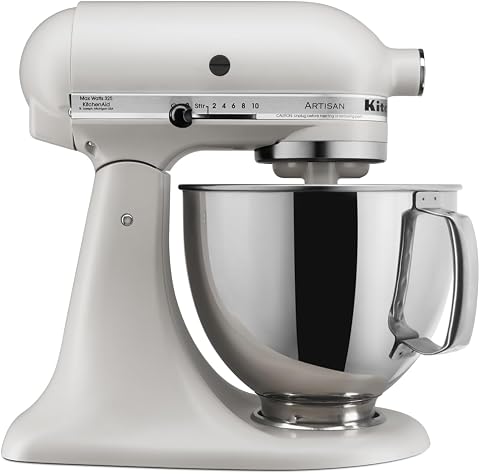
KitchenAid Artisan Series 5 Quart Tilt Head Stand Mixer
- ✔ Weight: 26 lbs
- ✔ Warranty: 1-year limited
- ✔ Color Options: Multiple

KitchenAid Stand Mixer Attachment
- ✔ Weight: Varies
- ✔ Cleaning: Hand wash recommended
- ✔ Storage: Included in a storage case
KitchenAid Artisan Series 5 Quart Tilt Head Stand Mixer
The KitchenAid Artisan Series 5 Quart Tilt Head Stand Mixer is built to last with durable metal construction and a versatile tilt-head design. When it won’t tilt back, most issues are mechanical or debris-related, which can be addressed with careful cleaning and lubrication. Regular maintenance can prevent future problems, ensuring your mixer remains a kitchen essential for years.
Pros:
- Solid metal build for durability
- Easy tilt-head access for cleaning
- Multiple color options
- Powerful 10-speed motor
Cons:
- Hinge can get stuck over time
- Requires occasional lubrication
- Potential for misalignment if not maintained
Best for: Home bakers who want a reliable, stylish mixer with straightforward maintenance
Not ideal for: Users expecting a completely tool-free fix for all mechanical issues
Bottom line: Regular cleaning and lubrication are key to preventing tilt head issues.
KitchenAid Stand Mixer Attachment
If you’re looking to expand your KitchenAid’s capabilities, the Metal Food Grinder attachment connects easily to the power hub, allowing for fresh grinding of meats, vegetables, and more. While it doesn’t directly fix tilt issues, maintaining your mixer with useful attachments can prolong its lifespan and functionality.
Pros:
- Versatile grinding options
- Easy to attach and use
- High-quality metal construction
- Includes multiple grinding plates
Cons:
- Additional cost for attachments
- Requires cleaning after use
- Not directly related to tilt issues
Best for: Home cooks wanting fresh, customizable ingredients
Not ideal for: Users seeking immediate repair solutions for tilt head problems
Bottom line: A great accessory for expanding your mixer’s capabilities, not a fix for tilt head issues.
Frequently Asked Questions
Why won’t my KitchenAid tilt back?
Common reasons include debris buildup, hinge stiffness, or misalignment. Regular cleaning and lubrication usually resolve these issues.
Is it safe to fix the tilt head myself?
Yes, as long as you unplug the mixer and follow proper steps, you can safely perform basic cleaning and lubrication. For damaged parts, consult a professional.
Can I lubricate the hinge myself?
Yes, using a food-grade silicone spray is recommended. Apply sparingly and move the tilt head to distribute the lubricant evenly.
How often should I clean and lubricate the hinge?
Every 6-12 months, or if you notice stiffness or resistance when tilting the head.
When should I seek professional repair?
If cleaning and lubrication don’t restore proper movement, or if you notice bent or broken parts, professional repair is advised.
Keep Your KitchenAid Running Smoothly
Maintaining your KitchenAid Artisan tilt head mixer with regular cleaning, lubrication, and careful inspection can prevent many common issues. If your mixer still won’t tilt back after troubleshooting, don’t hesitate to seek professional help to avoid further damage. Proper care ensures your mixer remains a reliable workhorse in your kitchen for years to come.
Affiliate disclosure: As an Amazon Associate we earn from qualifying purchases. Prices and availability are accurate as of the time of publishing.