
Editorial update log
November 17, 2026:
Deal update: RoundupForge price history now flags ASIN B075BF6V58 on amazon.com as below its typical tracked range. RF labels the deal as all_time_low.
Exact pricing remains intentionally gated through the live Grimfaste price module in the article.
Among smart thermostats with energy monitoring, the ecobee Smart Thermostat Enhanced is my best overall pick for balancing energy-use insights with room for smarter comfort control. The ecobee Premium adds built-in voice features and a SmartSensor, while the Amazon Smart Thermostat is a simpler choice for Alexa households. The main tradeoffs are how much detail you want from energy reports, whether your HVAC wiring is compatible, and how much automation you need. Some models focus on scheduling and savings reports; others add sensors, voice control, or broader smart-home support. Read on for the full comparison and guidance on choosing a thermostat that fits your system and your energy-tracking needs.

Get home appliances delivered free with Prime
- Fast, free delivery on millions of items
- Prime Video, Amazon Music and more included
- Member-only deals all year
Complete the kit



Key Takeaways
- Energy monitoring is not equally detailed across this lineup: ecobee models stand out for pairing usage insights with occupancy or room-sensor features, while simpler options lean more on schedules and basic reports.
- The ecobee Enhanced is the strongest balance of insight and control: it offers more room-aware comfort features than basic models without the Premium model’s broader built-in voice hardware.
- Premium features matter most when they solve a real household problem: the ecobee Premium’s SmartSensor and voice options suit homes that want extra room coverage and integrated controls, not just a thermostat dashboard.
- Google Nest, Amazon, and Matter-compatible options serve different smart-home setups: buyers should match ecosystem support to devices already in the home rather than assume every thermostat works equally well with every platform.
- Compatibility can outweigh the feature list: wiring, HVAC type, and the need for a C-wire vary across these 15 models, so checking the system before choosing can prevent a poor fit.
| Sensi Lite Wi-Fi Smart Thermostat (ST25) | 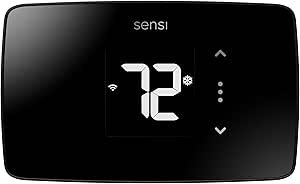 | Best for Straightforward Energy Tracking | Model: ST25 | Connectivity: 2.4 GHz Wi-Fi | Compatible systems: Air conditioner, boiler, furnace, and heat pump | VIEW LATEST PRICE | See Our Full Breakdown |
| Honeywell Home RTH9585WF1004 Wi-Fi Smart Color Thermostat |  | Best for Visible Energy Reports | Model: RTH9585WF1004 | Connectivity: Wi-Fi | Display: Customizable color touchscreen | VIEW LATEST PRICE | See Our Full Breakdown |
| ecobee Smart Thermostat Essential, Wi-Fi |  | Best for Cross-Platform Smart Homes | Connectivity: Wi-Fi | Display: 3.74-inch LCD touchscreen | Power: Battery powered; Power Extender Kit required for homes without a C-wire | VIEW LATEST PRICE | See Our Full Breakdown |
| Amazon Smart Thermostat |  | Best for Alexa-First Homes | Model: S6ED3R | Dimensions: 3.56 × 3.56 × 0.84 inches | Weight: 3.86 ounces | VIEW LATEST PRICE | See Our Full Breakdown |
| Honeywell Home X7B Smart Wi-Fi Programmable Thermostat |  | Best for Matter and Dual-Band Wi-Fi | Model: X7BWF1W/W | Display: 4.3-inch customizable touchscreen | Connectivity: 2.4 or 5.0 GHz Wi-Fi; Matter | VIEW LATEST PRICE | See Our Full Breakdown |
| Honeywell Home RTH9600WF Smart Color Wi-Fi Thermostat |  | Best for At-a-Glance Energy Information | Model: RTH9600WF | Connectivity: Wi-Fi | Display: Selectable color LCD touchscreen | VIEW LATEST PRICE | See Our Full Breakdown |
| meross Matter Smart Wi-Fi Thermostat for 24V HVAC Systems |  | Best for Matter Smart Homes | System compatibility: 24V HVAC; supports approximately 95% of systems | Supported systems: Air conditioner, boiler, dehumidifier, furnace, heat pump, and humidifier | Connectivity: Wi-Fi and Matter | VIEW LATEST PRICE | See Our Full Breakdown |
| Honeywell Home T5 Smart Wi-Fi Thermostat |  | Best for Geofencing and Simple Energy Reports | Model: RTH8800WF2022 | Connectivity: Wi-Fi | Display: 4.95-inch LCD touchscreen | VIEW LATEST PRICE | See Our Full Breakdown |
| ecobee Smart Thermostat Enhanced |  | Best for Occupancy-Based Energy Control | HVAC compatibility: Compatible with 90% of HVAC systems | Connectivity: Wi-Fi | Power: 24V corded electric | VIEW LATEST PRICE | See Our Full Breakdown |
| ecobee Smart Thermostat Premium with Wi-Fi, Built-In Siri and Alexa, and SmartSensor |  | Best Premium Room-by-Room Energy Monitoring Pick | Connectivity: Wi-Fi | Voice assistants: Siri and Alexa built in | Included sensor: SmartSensor | VIEW LATEST PRICE | See Our Full Breakdown |
| Vine Smart Thermostat for Home |  | Best for Geofenced Energy Saving | Connectivity: Wi-Fi | Voice assistants: Amazon Alexa and Google Assistant | Scheduling: 7-day, 8-period programmable schedule | VIEW LATEST PRICE | See Our Full Breakdown |
| Sensi ST55 Wi-Fi Smart Thermostat |  | Best for Energy-Use Visibility | Model: ST55 | Connectivity: Wi-Fi | Energy certification: ENERGY STAR | VIEW LATEST PRICE | See Our Full Breakdown |
| Google Nest Smart Thermostat, Fog |  | Best for Google Home Households | Color: Fog | Connectivity: Wi-Fi | Energy certification: ENERGY STAR | VIEW LATEST PRICE | See Our Full Breakdown |
| Google Nest Smart Thermostat, Charcoal | 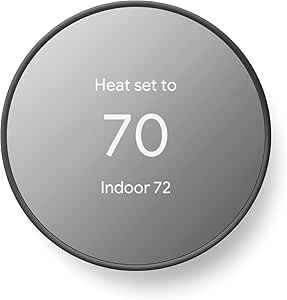 | Best for a Simple DIY Upgrade | Color: Charcoal | Connectivity: Wi-Fi 2.4 GHz and 5 GHz; Bluetooth Low Energy | Power: Battery powered; two included A batteries | VIEW LATEST PRICE | See Our Full Breakdown |
| Google Nest Smart Thermostat, Wi-Fi, Snow |  | Best Compact Nest Option | Color: Snow | Connectivity: Wi-Fi 2.4 GHz and 5 GHz; Bluetooth Low Energy | Power: Battery powered | VIEW LATEST PRICE | See Our Full Breakdown |
| smart thermostats with energy monitoring | Connectivity | Power | Display |
|---|---|---|---|
| Sensi Lite Wi-Fi Smart Thermos | 2.4 GHz Wi-Fi | Battery or C-wire | LCD |
| Honeywell Home RTH9585WF1004 W | Wi-Fi | AC power; C-wire required | Customizable color touchscreen |
| ecobee Smart Thermostat Essent | Wi-Fi | Battery powered; Power Extender Kit required for homes without a C-wire | 3.74-inch LCD touchscreen |
| Amazon Smart Thermostat | — | C-wire or separately sold power adapter | — |
| Honeywell Home X7B Smart Wi-Fi | 2.4 or 5.0 GHz Wi-Fi; Matter | Hardwired, 24 V; C-wire required | 4.3-inch customizable touchscreen |
| Honeywell Home RTH9600WF Smart | Wi-Fi | Battery powered; 24 volts | Selectable color LCD touchscreen |
| meross Matter Smart Wi-Fi Ther | Wi-Fi and Matter | — | LED |
| Honeywell Home T5 Smart Wi-Fi | Wi-Fi | — | 4.95-inch LCD touchscreen |
| ecobee Smart Thermostat Enhanc | Wi-Fi | 24V corded electric | 4-inch LCD |
| ecobee Smart Thermostat Premiu | Wi-Fi | — | — |
| Vine Smart Thermostat for Home | Wi-Fi | Corded electric; C-wire required | — |
| Sensi ST55 Wi-Fi Smart Thermos | Wi-Fi | 24 V AC; common wire not required for most installations | — |
| Google Nest Smart Thermostat | Wi-Fi | — | — |
| Google Nest Smart Thermostat | Wi-Fi 2.4 GHz and 5 GHz; Bluetooth Low Energy | Battery powered; two included A batteries | 2-inch LCD |
| Google Nest Smart Thermostat | Wi-Fi 2.4 GHz and 5 GHz; Bluetooth Low Energy | Battery powered | 1.07-inch LCD |
More Details on Our Top Picks
Sensi Lite Wi-Fi Smart Thermostat (ST25)
The Sensi Lite is a good fit if you want scheduling and usage reports without a complicated smart-home setup. Its ENERGY STAR certification, geofencing, and remote app access give you several ways to adjust heating or cooling when routines change, while the reports help you review usage. Compared with the Honeywell Home RTH9585WF1004, it has a simpler LCD rather than a customizable color touchscreen, but its battery-or-C-wire power options can make installation less restrictive on compatible systems. DIY instructions and a built-in level are practical help for first-time installers. The tradeoff is that heat-pump and heat/cool-only installations require a C-wire, and Wi-Fi must be on 2.4 GHz. Choose it for accessible usage insights, not for detailed circuit-level energy measurement.
Pros:- ENERGY STAR certified, with scheduling, geofencing, remote access, and usage reports
- DIY installation guidance includes a built-in level and step-by-step instructions
- App, touch, and voice controls support flexible everyday adjustments
- Can use batteries or a C-wire on compatible systems
Cons:- Requires a C-wire for heat-pump and heat/cool-only systems
- Connects only to 2.4 GHz Wi-Fi
- LCD display is less customizable than the Honeywell RTH9585WF1004 touchscreen
Best for: Homeowners with compatible HVAC who want app-based schedules, geofencing, and usage reports in a DIY-friendly thermostat.
Not ideal for: Households with heat-pump or heat/cool-only wiring but no C-wire, or homes that rely on 5 GHz-only Wi-Fi.
- Model:ST25
- Connectivity:2.4 GHz Wi-Fi
- Compatible systems:Air conditioner, boiler, furnace, and heat pump
- Controls:App, touch, and voice
- Voice assistants:Amazon Alexa and Google Assistant
- Power:Battery or C-wire
- Display:LCD
- Warranty:3 years
Our verdict“Choose the Sensi Lite if you want approachable scheduling and usage reports, and your wiring and 2.4 GHz network meet its requirements.”
Honeywell Home RTH9585WF1004 Wi-Fi Smart Color Thermostat
The RTH9585WF1004 makes energy information easy to reach through its color touchscreen, energy reports, and equipment alerts. That combination suits buyers who want to check usage and receive reminders at the thermostat itself, rather than relying only on an app. It also supports flexible schedules and remote control through Honeywell’s app, Alexa, or Google Home. Compared with the simpler Sensi Lite, this model puts more information and customization on the wall-mounted display, but it has a firm C-wire requirement. Its system exclusions matter too: it does not support 120–240 V electric baseboard heat or heating-only oil furnaces without a C-wire. The reports are useful for reviewing thermostat-related usage, but this is not whole-home electrical monitoring.
Pros:- Customizable color touchscreen presents controls and energy information on the device
- Energy reports and equipment alerts support usage review and maintenance reminders
- Flexible scheduling and remote app control
- Works with Amazon Alexa and Google Home
Cons:- C-wire is required for installation
- Not compatible with 120–240 V electric baseboard heat
- Heating-only oil furnaces without a C-wire are excluded
Best for: Households with a compatible forced-air, hot-water, steam, or heat-pump system that want reports and alerts visible on a color touchscreen.
Not ideal for: Homes with electric baseboard heating, excluded oil-furnace wiring, or no C-wire available.
- Model:RTH9585WF1004
- Connectivity:Wi-Fi
- Display:Customizable color touchscreen
- Power:AC power; C-wire required
- Compatible systems:Forced-air gas, oil, or electric; hot water and steam; heat pumps with electric backup
- Smart-home compatibility:Amazon Alexa and Google Home
- Energy features:Energy reports and equipment alerts
- Energy certification:ENERGY STAR
Our verdict“Pick this Honeywell if an at-the-wall color display and energy reports matter more to you than flexible wiring requirements.”
ecobee Smart Thermostat Essential, Wi-Fi
The ecobee Smart Thermostat Essential is the most flexible pick here for households that mix smart-home platforms: it supports Apple HomeKit, Google Assistant, and Alexa, alongside app and touchscreen control. Auto-away, auto-scheduling, fan control, and humidity detection give it more ways to adapt comfort settings than the basic Amazon Smart Thermostat, which is closely tied to Alexa. That flexibility makes the Essential appealing if energy-conscious scheduling should fit into a broader home setup. There are limits: HVAC compatibility varies, homes without a C-wire may need a separately sold Power Extender Kit, and the optional SmartSensor costs extra. Its energy-saving figure is a manufacturer claim, not a guaranteed result for every home. The listed savings tools focus on temperature management, not direct measurement of electricity use.
Pros:- Supports Apple HomeKit, Google Assistant, and Amazon Alexa
- Auto-away and auto-scheduling can adjust settings around household routines
- Touchscreen and app control, plus fan control and indoor humidity detection
- Designed for DIY installation
Cons:- HVAC compatibility should be checked before purchase
- Homes without a C-wire may need a separately sold Power Extender Kit
- SmartSensor is optional and sold separately
Best for: Smart-home households using Apple HomeKit, Google Assistant, or Alexa that want automatic scheduling and humidity-aware control.
Not ideal for: Buyers who need guaranteed fit without checking their HVAC wiring, or who want a remote sensor included and ready to use.
- Connectivity:Wi-Fi
- Display:3.74-inch LCD touchscreen
- Power:Battery powered; Power Extender Kit required for homes without a C-wire
- Compatible systems:Most 24 VAC systems, including gas, oil, electric, dual fuel, forced air, heat pumps, and boilers
- Smart-home compatibility:Apple HomeKit, Google Assistant, and Amazon Alexa
- Automation:Auto-away and auto-scheduling
- Additional monitoring:Indoor humidity detection
- SmartSensor:Optional; sold separately
Our verdict“Choose the ecobee Essential if cross-platform control and automatic schedules matter more than included sensors or simple wiring requirements.”
Amazon Smart Thermostat
The Amazon Smart Thermostat is the straightforward choice for buyers already using Alexa who want schedules, remote control, and automatic temperature adjustments in one ecosystem. Alexa app controls and compatible voice devices make routine changes easy, while ENERGY STAR certification and scheduled settings support more deliberate heating and cooling habits. Compared with the ecobee Smart Thermostat Essential, this model is less suitable for mixed-platform homes: the supplied information emphasizes Alexa rather than Apple HomeKit or Google Assistant support. It also lacks the ecobee’s listed humidity detection. Installation calls for a C-wire or separately sold power adapter, and its 2.4 GHz Wi-Fi requirement rules out 5 GHz-only setups. Its energy-management value comes from controlling temperature and schedules, not measuring whole-home energy consumption.
Pros:- Alexa app and compatible voice control support remote adjustments
- Schedules, comfort zones, and automatic temperature adjustments help manage heating and cooling
- ENERGY STAR and ECOLOGO Gold certifications
- Guided app-based installation and included wall plate
Cons:- Requires a C-wire or separately sold power adapter
- Does not support 5 GHz Wi-Fi
- Not compatible with 110–240 V HVAC systems such as electric baseboard heat
Best for: Alexa households with compatible 24V HVAC that want app-based scheduling, remote temperature control, and voice operation.
Not ideal for: Homes without a C-wire or compatible power adapter, households using 5 GHz-only Wi-Fi, and systems such as electric baseboard heat.
- Model:S6ED3R
- Dimensions:3.56 × 3.56 × 0.84 inches
- Weight:3.86 ounces
- HVAC compatibility:Most 24V systems, including conventional forced air, heat pump, and radiant boiler
- Power:C-wire or separately sold power adapter
- Wi-Fi:2.4 GHz; does not support 5 GHz
- Controls:Three touch buttons, Alexa app, and compatible voice control
- Certifications:ENERGY STAR and ECOLOGO Gold
Our verdict“Choose this thermostat if Alexa is your main smart-home platform and your wiring and Wi-Fi fit its requirements.”
Honeywell Home X7B Smart Wi-Fi Programmable Thermostat
The Honeywell Home X7B is the clearest choice in this group for buyers who want Matter support and 2.4 or 5 GHz Wi-Fi. Those connections give it a broader smart-home and network fit than the 2.4 GHz-only Amazon Smart Thermostat, while Alexa, Google Assistant, and Apple Home support make it less tied to one assistant. Its 4.3-inch customizable touchscreen and humidity monitoring add useful on-device information, and ENERGY STAR certification pairs with programmable temperature control for routine energy management. The compromise is installation: it is hardwired and requires a C-wire, though a C-wire adapter voucher is included. Check system compatibility carefully, since some HVAC setups may need extra equipment or accessories. Its humidity monitoring is not the same as direct energy-use measurement.
Pros:- Matter certified and compatible with Alexa, Google Assistant, and Apple Home
- Supports both 2.4 and 5.0 GHz Wi-Fi
- Customizable 4.3-inch touchscreen with humidity monitoring
- ENERGY STAR certified; C-wire adapter voucher included
Cons:- C-wire is required, despite the included adapter voucher
- Not compatible with 120–240 V electric baseboard heat
- Some HVAC systems may need additional equipment or accessories
Best for: Homeowners with supported 24V HVAC who want Matter-compatible controls, a large touchscreen, humidity monitoring, and access to both Wi-Fi bands.
Not ideal for: Homes with electric baseboard heat, no workable C-wire solution, or HVAC configurations that need accessories the buyer does not want to add.
- Model:X7BWF1W/W
- Display:4.3-inch customizable touchscreen
- Connectivity:2.4 or 5.0 GHz Wi-Fi; Matter
- Power:Hardwired, 24 V; C-wire required
- System compatibility:Up to 3 heat/2 cool heat pump with electric backup, or 2 heat/2 cool conventional systems
- Smart-home compatibility:Amazon Alexa, Google Assistant, and Apple Home
- Energy and environmental features:ENERGY STAR certification and humidity monitoring
- Dimensions:0.96 × 3.54 × 5.24 inches
Our verdict“Pick the X7B if Matter, dual-band Wi-Fi, and on-device humidity information outweigh its hardwired installation requirements.”
Honeywell Home RTH9600WF Smart Color Wi-Fi Thermostat
The RTH9600WF suits buyers who want energy tracking alongside useful information on the thermostat itself, rather than relying mainly on an app. Its color touchscreen displays temperature, humidity, and weather, while app access and compatible voice assistants handle remote adjustments. Flexible scheduling and energy monitoring give it more day-to-day control than a basic programmable thermostat. Compared with the Honeywell Home T5, this model puts more emphasis on a customizable color display and visible household conditions; the T5’s geofencing is the clearer draw for automatic away adjustments. The tradeoff is installation flexibility: this Honeywell requires a C-wire or compatible adapter and does not work with electric baseboard heat. I’d choose it for a compatible forced-air or hydronic system, not for a home where wiring or system type is uncertain.
Pros:- Customizable color touchscreen surfaces household conditions at a glance
- App and compatible voice-assistant control allow remote adjustments
- Flexible programming and energy tracking support routine-based use
- Weather, humidity, and smart alerts add useful context to temperature control
Cons:- Requires a C-wire or compatible power adapter
- Not compatible with electric baseboard heating
- Lacks the T5’s location-based geofencing
Best for: Homeowners with compatible 24V HVAC who want energy-use information, weather, and humidity visible on a customizable thermostat screen.
Not ideal for: Homes with 120–240V electric baseboard heat or installations without a C-wire or compatible power adapter.
- Model:RTH9600WF
- Connectivity:Wi-Fi
- Display:Selectable color LCD touchscreen
- Power:Battery powered; 24 volts
- System compatibility:Forced air, hot water, steam, and heat pumps with electric backup
- Wiring:C-wire required
- Smart home compatibility:Amazon Alexa, Google Assistant, Microsoft Cortana, and IFTTT
- Mounting:Wall mount
Our verdict“Choose the RTH9600WF if you want energy tracking and household conditions displayed on a color screen and your HVAC system is compatible.”
meross Matter Smart Wi-Fi Thermostat for 24V HVAC Systems
The meross Matter thermostat is the lineup’s clearest fit for buyers who want HVAC usage tracking to sit inside a multi-platform smart home. Matter support connects it with Apple Home, Google Home, Alexa, Home Assistant, and SmartThings, while custom schedules, app control, and system alerts cover everyday thermostat needs. Compared with the Honeywell Home RTH9600WF, meross offers broader Matter-oriented platform choice, while Honeywell provides a more information-rich color touchscreen. The meross display is LED, so it is the more functional than decorative choice. Its broad 24V compatibility still has firm boundaries: it excludes electric baseboard, millivolt, and two-wire systems, and some installations need a C-wire that is not included. I’d shortlist it for a Matter-equipped home only after checking the existing wiring and HVAC type.
Pros:- Matter support spans several major smart-home platforms
- HVAC usage tracking and system alerts complement remote control
- Customizable 24/7 schedules support different daily routines
- Supports a broad range of 24V equipment, including heat pumps and boilers
Cons:- Some wiring setups require a C-wire that is not included
- Does not support electric baseboard, millivolt, or two-wire systems
- LED display is less information-rich than the RTH9600WF color touchscreen
Best for: Homeowners with compatible 24V HVAC who use Matter platforms such as Apple Home, Google Home, or Home Assistant and want HVAC usage tracking.
Not ideal for: People with electric baseboard, millivolt, or two-wire systems, or buyers who need a C-wire supplied in the box.
- System compatibility:24V HVAC; supports approximately 95% of systems
- Supported systems:Air conditioner, boiler, dehumidifier, furnace, heat pump, and humidifier
- Connectivity:Wi-Fi and Matter
- Smart home platforms:Apple Home, Amazon Alexa, Google Home, Home Assistant, and Samsung SmartThings
- Control:App and voice
- Scheduling:Customizable 24/7 schedules
- Display:LED
- Wiring exclusions:No 110V/120V/240V electric baseboard, millivolt, or two-wire systems
Our verdict“Pick meross for cross-platform Matter control and HVAC usage tracking if your system is compatible and its wiring requirements are met.”
Honeywell Home T5 Smart Wi-Fi Thermostat
The Honeywell Home T5 makes its case with practical automation: geofencing can adjust temperatures around household members’ locations, while seven-day schedules, auto-away, and vacation mode add control for routines that change. Its monthly energy reports make usage easier to review, though this is more of a reporting-focused pick than a thermostat with a prominently described live energy dashboard. Compared with the RTH9600WF, the T5 trades the latter’s customizable color screen and on-device weather and humidity information for location-based control and a 4.95-inch LCD touchscreen. It also supports Apple HomeKit alongside Alexa and Google Assistant. Wiring deserves a check before buying: some installations need a C-wire or adapter, and heating-only oil furnace systems require a C-wire. I’d choose it when automatic away adjustments matter more than a richer display.
Pros:- Geofencing and auto-away can adjust settings based on location
- Seven-day scheduling, vacation mode, and fan control offer routine flexibility
- Monthly energy reports provide a way to review usage
- Works with Alexa, Google Assistant, and Apple HomeKit
Cons:- Some installations require a C-wire or compatible power adapter
- Heating-only oil furnace systems need a C-wire
- Energy reporting is less focused on at-a-glance screen information than the RTH9600WF
Best for: Households with compatible heating and cooling systems that want location-based temperature adjustments, programmable schedules, and monthly energy reports.
Not ideal for: Owners of heating-only oil furnaces without a C-wire, or buyers seeking detailed energy information directly on a color display.
- Model:RTH8800WF2022
- Connectivity:Wi-Fi
- Display:4.95-inch LCD touchscreen
- Temperature control:Heating and cooling
- Scheduling:7-day programmable
- Automation:Geofencing, auto-away, vacation mode, fan control, and auto changeover
- Smart home compatibility:Amazon Alexa, Google Assistant, Apple HomeKit, Android, and iOS
- Certification and wiring:ENERGY STAR certified; C-wire required for some installations
Our verdict“Choose the T5 if geofencing and monthly energy reports matter more to you than a customizable color screen.”
ecobee Smart Thermostat Enhanced
The ecobee Smart Thermostat Enhanced is a strong match for buyers who want temperature decisions to account for whether someone is home, not just the time on a schedule. Its occupancy- and schedule-based adjustments are intended to help manage energy use, and the included Power Extender Kit gives homes without a C-wire an installation option that the Honeywell T5 does not list in its box contents. It also supports Alexa, Google Assistant, Apple HomeKit, and SmartThings. Against the ecobee Premium, Enhanced covers the core occupancy and app-control pitch without the Premium’s included SmartSensor, air-quality monitoring, or built-in voice speaker. That makes it a more focused option, but room-by-room sensing means buying SmartSensors separately. Check HVAC compatibility before installation; the kit helps with power wiring, not with unsupported equipment.
Pros:- Occupancy and schedule-based adjustments can respond to patterns of home use
- Power Extender Kit provides an option for installations without a C-wire
- Supports Alexa, Google Assistant, Apple HomeKit, and SmartThings
- ENERGY STAR certification and app control suit energy-conscious routines
Cons:- SmartSensors for room-by-room comfort are sold separately
- HVAC compatibility should be checked before installation
- Does not include the Premium model’s air-quality monitoring or built-in speaker
Best for: Homeowners with compatible HVAC who want occupancy-aware temperature adjustments and need a supplied power option for a system without a C-wire.
Not ideal for: Buyers who want an included room sensor, built-in air-quality monitoring, or voice-speaker features without stepping up to the Premium model.
- HVAC compatibility:Compatible with 90% of HVAC systems
- Connectivity:Wi-Fi
- Power:24V corded electric
- Display:4-inch LCD
- Included installation accessories:Power Extender Kit and trim kit
- Voice assistants:Amazon Alexa, Google Assistant, Apple HomeKit, and SmartThings
- Certification:ENERGY STAR
- Warranty:3 years
Our verdict“Choose ecobee Enhanced for occupancy-aware control and a supplied no-C-wire power kit, but choose Premium if you want a sensor and air-quality features included.”
ecobee Smart Thermostat Premium with Wi-Fi, Built-In Siri and Alexa, and SmartSensor
The ecobee Smart Thermostat Premium is the feature-rich choice for households where one thermostat reading does not reflect comfort across the home. Its included SmartSensor can account for occupancy and temperature in another room, while the built-in air-quality monitor adds alerts and filter reminders. For energy-conscious buyers, the distinction is that room sensing can inform comfort adjustments; the supplied details do not specify a separate energy-usage report. Compared with the ecobee Enhanced, Premium includes the sensor and adds air-quality monitoring, Siri and Alexa built in, and a speaker that supports audio. The extras also bring dependencies: Siri needs an Apple home hub, and some security features require a subscription. The Power Extender Kit and trim kit simplify installation, but HVAC compatibility still merits a check before purchase.
Pros:- Included SmartSensor can inform comfort adjustments using another room’s occupancy
- Built-in air-quality monitoring offers alerts and filter reminders
- Siri and Alexa are built in, with a speaker for Spotify and podcasts
- Power Extender Kit and trim kit are included for installation
Cons:- Siri requires an Apple home hub
- Some security features require an ecobee Smart Security subscription
- Its added sensing and air-quality features may exceed the needs of buyers seeking basic energy tracking
Best for: Households with uneven room temperatures that want an included occupancy sensor, air-quality alerts, and built-in voice control in one thermostat.
Not ideal for: Buyers who only need scheduling and app control, or who want Siri without an Apple home hub or security features without a subscription.
- Connectivity:Wi-Fi
- Voice assistants:Siri and Alexa built in
- Included sensor:SmartSensor
- HVAC compatibility:Compatible with 95% of HVAC systems
- Installation accessories:Power Extender Kit and trim kit
- Energy certification:ENERGY STAR
- Warranty:3 years
- Additional features:Built-in air-quality monitoring, voice control, and speaker
Our verdict“Choose Premium if room sensing and air-quality features are worth the added smart-home dependencies; otherwise, ecobee Enhanced is the more focused ecobee option.”
Vine Smart Thermostat for Home
I’d pick the Vine Smart Thermostat for buyers who want energy-saving automation without relying only on a fixed weekly schedule. Its geofence and auto-away modes can adjust heating or cooling when household members leave, while usage reporting is not specified—so it offers less visibility into energy use than the Sensi ST55, which provides usage reports. The Vine does add practical controls for daily management, including app and voice access, vacation mode, temperature alerts, and filter reminders. DIY installation is designed to take about 20 minutes, but the C-wire requirement rules it out for some older setups. An initial QR-code compatibility check is another setup step. This is a focused pick for households that value occupancy-based adjustment more than detailed energy tracking.
Pros:- Geofence and auto-away modes can reduce heating or cooling while the home is unoccupied.
- App, touch, Alexa, and Google Assistant controls offer several ways to adjust settings.
- Seven-day, eight-period scheduling supports different routines across the week.
- DIY installation is designed to take about 20 minutes and includes step-by-step guidance.
Cons:- Requires a C-wire, which may limit compatibility in older homes.
- The listing does not specify energy usage reports, unlike the Sensi ST55.
- The QR-code compatibility check adds a setup step before installation.
Best for: Households with a compatible 24V HVAC system and C-wire that want geofencing to reduce heating or cooling when nobody is home.
Not ideal for: Owners of older homes without a C-wire, or buyers who want usage reports to understand energy consumption.
- Connectivity:Wi-Fi
- Voice assistants:Amazon Alexa and Google Assistant
- Scheduling:7-day, 8-period programmable schedule
- Energy-saving features:Auto-away mode and geofencing
- Power:Corded electric; C-wire required
- HVAC compatibility:Up to 90% of 24V AC systems; air conditioners, boilers, furnaces, and heat pumps
- Controls and display:App, voice, and touch controls; LCD
- Dimensions:0.98 in D × 3.54 in W × 3.54 in H
Our verdict“Choose the Vine if geofenced away-mode control matters more to you than detailed energy-use reporting and your system has a C-wire.”
Sensi ST55 Wi-Fi Smart Thermostat
For buyers who want more than automated temperature changes, I’d favor the Sensi ST55 for its HVAC usage reports, system alerts, and filter reminders. Those reports give owners a way to review heating and cooling activity, a clearer energy-monitoring angle than the Vine thermostat, whose listed features focus on geofencing and scheduling. The Sensi also supports major voice platforms, including Apple HomeKit, and its app-guided installation includes a built-in level. A C-wire is not required for most installations, which makes it a more flexible candidate than the Vine, though compatibility still depends on the HVAC setup and a 24V AC connection is required. The tradeoff is a conventional button-led design rather than a more automation-centered feature set. I’d choose it for practical monitoring and broad smart-home support.
Pros:- Usage reports provide more visibility into HVAC activity than the Vine’s listed feature set.
- A C-wire is not required for most installations.
- Works with Alexa, Apple HomeKit, Google Assistant, SmartThings, and Vera.
- App instructions and a built-in level support DIY installation.
Cons:- Compatibility varies by HVAC system, so buyers need to check their wiring and equipment.
- Requires a 24V AC power connection.
- Does not list the Vine’s geofence and auto-away features.
Best for: Homeowners who want HVAC usage reports and alerts, plus broad voice-assistant support and a guided DIY setup.
Not ideal for: People with HVAC systems that lack a compatible 24V AC connection, or buyers who specifically want geofencing-based away control.
- Model:ST55
- Connectivity:Wi-Fi
- Energy certification:ENERGY STAR
- Energy monitoring:HVAC usage reports, alerts, and filter reminders
- Voice assistants and platforms:Amazon Alexa, Apple HomeKit, Google Assistant, SmartThings, and Vera
- Power:24 V AC; common wire not required for most installations
- Display and controls:5-inch LED screen; buttons, app, touch, and voice
- HVAC compatibility:Air conditioners, boilers, furnaces, and heat pumps
Our verdict“Choose the Sensi ST55 if usage reports and wide smart-home compatibility matter more than geofenced automation.”
Google Nest Smart Thermostat, Fog
The Google Nest Thermostat in Fog suits households already using Google Home and looking for hands-off temperature adjustments. It can follow a programmed schedule, adjust when residents leave, and provide alerts about potential issues on eligible HVAC systems. That makes it more focused on automatic control and system monitoring than the Sensi ST55, which explicitly offers usage reports. Buyers should distinguish those functions: Nest’s listed HVAC monitoring is not the same as a detailed energy-use report. Its DIY installation is designed to take about 30 minutes, and most homes can operate without a C-wire, though some systems need one or a power accessory. Compared with the Vine, Nest is the more natural fit for Google Home routines, while the Vine specifically lists geofencing. Internet access is needed for remote controls and notifications.
Pros:- Google Home app supports remote control and programmable schedules.
- Can adjust temperatures when residents leave.
- HVAC monitoring can provide alerts about potential issues on eligible systems.
- Designed for DIY installation in about 30 minutes and works without a C-wire in most homes.
Cons:- Some HVAC systems require a C-wire or compatible power accessory.
- Listed HVAC monitoring does not provide the usage reports specified for the Sensi ST55.
- Remote control and notifications depend on internet and Wi-Fi.
Best for: Google Home households seeking scheduled and away-based temperature adjustments with HVAC alerts on eligible systems.
Not ideal for: Buyers who want explicit HVAC usage reports, or owners whose system needs a C-wire or power accessory they do not plan to add.
- Color:Fog
- Connectivity:Wi-Fi
- Energy certification:ENERGY STAR
- Controls:Google Home app and compatible voice assistants
- Energy-related features:Programmable schedules, away-based temperature adjustments, and HVAC alerts on eligible systems
- C-wire:Not needed in most homes; some systems require one or a compatible power accessory
- HVAC compatibility:Works with 85% of heating and cooling systems
- Installation:DIY; typically 30 minutes or less
Our verdict“Choose the Fog Nest for Google Home scheduling and away adjustments, but choose the Sensi ST55 if usage reports are your priority.”
Google Nest Smart Thermostat, Charcoal
I’d choose the Charcoal Nest Thermostat for buyers who want a straightforward smart upgrade with away-based temperature adjustment, not a dedicated energy-reporting dashboard. The Google Home app handles scheduling and remote control, while compatible voice assistants add hands-free changes. Like the Fog version, it focuses on automated temperature management; the color is the main listed distinction, not a different monitoring feature set. That leaves the Sensi ST55 ahead for shoppers who specifically want HVAC usage reports, alerts, and filter reminders. Nest is easier to place among DIY options because most homes do not need a C-wire, but some HVAC systems still require one or a power accessory. Wi-Fi is also needed for remote functions and notifications, so this is less appealing to buyers who want monitoring that works independently of a home network.
Pros:- Away-based adjustments can reduce heating or cooling when the home is unoccupied.
- Google Home supports remote control and scheduling.
- Works with compatible voice assistants and smart-home platforms.
- Designed for DIY installation, with no C-wire needed in most homes.
Cons:- Some HVAC systems need a C-wire or compatible power accessory.
- Does not list usage reports like the Sensi ST55.
- Remote controls and mobile notifications require working Wi-Fi and internet.
Best for: DIY-minded households seeking a Google Home thermostat that can schedule temperatures and adjust them when the home is empty.
Not ideal for: Buyers seeking detailed HVAC usage reports, or households with unreliable Wi-Fi that need remote features and notifications.
- Color:Charcoal
- Connectivity:Wi-Fi 2.4 GHz and 5 GHz; Bluetooth Low Energy
- Power:Battery powered; two included A batteries
- Voltage:24 volts
- Display:2-inch LCD
- Energy certification:ENERGY STAR
- Controls:Remote and voice
- C-wire:Not needed in most homes; some systems require one or a compatible power accessory
Our verdict“Choose the Charcoal Nest for accessible DIY scheduling and away adjustments, not for detailed energy-use reporting.”
Google Nest Smart Thermostat, Wi-Fi, Snow
The Snow Nest Thermostat offers the same core Nest approach in a version whose listed screen is 1.07 inches, making it the compact-display option in this group. It supports schedules, remote app control, voice commands, and temperature adjustment when residents leave. Its HVAC monitoring is useful for alerts, but the product details do not list the kind of usage reports provided by the Sensi ST55; buyers looking to review HVAC activity should favor Sensi. Compared with the Charcoal Nest, the Snow model has the smaller stated display, while both share Wi-Fi and Bluetooth connectivity and the same C-wire caveat. Most homes can use it without a C-wire, though some systems need one or a compatible power accessory. It fits buyers who value a compact screen and Nest controls more than detailed energy tracking.
Pros:- Programmable schedules and away adjustments support energy-conscious temperature control.
- App and compatible voice-assistant controls allow remote adjustment.
- HVAC monitoring can provide alerts.
- Most homes do not need a C-wire.
Cons:- The 1.07-inch screen is smaller than the Charcoal Nest’s listed 2-inch display.
- Usage reports are not listed, unlike on the Sensi ST55.
- Some systems require a C-wire or compatible power accessory, and remote features depend on Wi-Fi.
Best for: Nest and Google Home users who prefer a compact display and want scheduling, away adjustments, and HVAC alerts.
Not ideal for: Shoppers who need detailed energy-use reports or prefer a larger display, such as the Charcoal Nest’s listed 2-inch screen.
- Color:Snow
- Connectivity:Wi-Fi 2.4 GHz and 5 GHz; Bluetooth Low Energy
- Power:Battery powered
- Voltage:24 volts
- Display:1.07-inch LCD
- Temperature control:Heating and cooling
- Smart-home compatibility:Google Assistant, Alexa, and Matter-certified voice assistants
- Features:Programmable schedule, remote control, and HVAC monitoring
Our verdict“Choose the Snow Nest if you want a compact-display Nest with schedules and away adjustments, and skip it if detailed usage reports are a must.”

How We Picked
I compared these thermostats through the lens of energy monitoring, looking at whether each option helps a household understand heating and cooling use, adjust schedules, and connect those insights to practical comfort controls. I also weighed HVAC compatibility and wiring requirements, app and setup usability, smart-home support, room-sensing options, and the amount of ongoing attention each model may ask from its owner.
The ranking favors products that combine useful energy-related feedback with controls that can act on it, rather than models that offer a long feature list without clear value for energy-conscious buyers. Higher placements reflect a stronger balance of monitoring, flexibility, and fit for varied homes; narrower picks rank lower because they suit a particular ecosystem, budget approach, or installation situation. Since energy dashboards and savings estimates do not guarantee lower bills, I treat them as decision aids—not proof of a specific outcome—and recommend checking each model’s current compatibility details before purchase.
Factors to Consider When Choosing Smart Thermostats With Energy Monitoring
Energy monitoring can help show when heating and cooling run and whether schedule changes are affecting use, but the thermostat is only one part of the picture. I’d start with the home’s equipment and daily routine, then decide how much reporting and automation will actually be useful.
Match the Thermostat to Your HVAC System
Before comparing apps or energy reports, identify whether your system uses conventional heating and cooling, a heat pump, multiple stages, or another configuration. Thermostats that look similar can support different equipment, and a mismatch may limit functions or prevent installation. Check the model’s compatibility information against the exact wires and system type, not just the thermostat brand or age. A C-wire can provide steady power, but some installations may use an adapter or another supported arrangement. If your wiring is unclear, photographing the current terminals and asking a qualified installer is safer than guessing from wire colors. A feature-rich thermostat that cannot control your system is a worse choice than a simpler compatible model.
Decide What Energy Monitoring Needs to Show
Energy features vary from basic runtime summaries to reports that connect schedules, occupancy, and temperature settings with heating or cooling activity. Think about the question you want the app to answer: whether the system runs at unusual times, whether a schedule is helping, or which rooms need different control. Reports are most useful when they help you make a specific change, such as adjusting a setback or correcting a schedule. Treat savings projections as estimates, since weather, insulation, utility rates, and household habits all affect actual bills. If you mainly want a record of system use, paying extra for advanced sensors may not add much value. If you want to act on room-to-room differences, sensor support can make the monitoring more actionable.
Check Whether Sensors Address a Real Comfort Problem
A thermostat in a hallway may not reflect temperatures in bedrooms, sunrooms, or rooms above a garage. Remote sensors can help a system respond to selected rooms or occupancy patterns, but their usefulness depends on placement and how the thermostat uses their readings. Before buying sensors, note where comfort complaints occur and when those rooms are occupied. One sensor may be enough for a single problem area; a larger home may need a broader plan. Sensors do not fix poor insulation, blocked vents, or an incorrectly balanced HVAC system, so they should not be treated as a substitute for maintenance. Choose a sensor-ready model when room imbalance is a recurring issue, not simply because the feature sounds advanced.
Choose for Your Smart-Home Ecosystem
Voice assistants, smart speakers, and home-automation platforms can make thermostat controls easier, but compatibility differs by model and setup. Start with the devices and routines already used in your household, then confirm which functions work together; basic voice commands do not always mean every setting or report is available through that assistant. Matter support can be useful for a mixed-brand home, yet it is still sensible to verify the specific thermostat’s supported features and required apps. Avoid choosing by ecosystem label alone if you rely on a particular automation, such as geofencing or a multi-device routine. A thermostat with fewer integrations may be easier to manage if you only need reliable scheduling and app access. The best fit is the one household members will actually use.
Balance Upfront Complexity Against Long-Term Use
More controls can improve flexibility, but they can also add setup steps, account requirements, and ongoing decisions about schedules or sensors. A beginner may get more benefit from a clear app and dependable basic programming than from advanced automation that stays unused. Households with changing schedules may value geofencing or occupancy features, while a consistent routine can be handled well by a weekly program. Check whether the thermostat depends on a hub, subscription, or extra accessories for the functions you care about. Also consider who will manage settings after installation; an easy-to-read display can matter as much as app features for shared homes. Pay more only when the added monitoring or comfort control solves a specific problem.
Frequently Asked Questions
Do all 15 thermostats provide detailed energy-use data?
No. Energy-related features differ in how much runtime information, scheduling feedback, or estimated savings they present, and some models emphasize control features more than detailed reporting. Before choosing, check the current app documentation for the exact reports available with that model. Think about whether you want historical usage, prompts to adjust settings, or simply remote access and scheduling. A thermostat’s estimates are not a guarantee of bill savings because weather, home efficiency, and utility rates also matter. If detailed reporting is your main reason for upgrading, give that feature more weight than voice control or display style.
Can I install one of these thermostats if my current system has no C-wire?
Possibly, but the answer depends on both the thermostat and the HVAC system. Some models have different power options or may support an approved adapter, while others specify a C-wire requirement. Do not assume that unused wires behind the wall are connected at the furnace or air handler. Compare the thermostat’s wiring guide with the terminals at both ends, and seek professional help if the system has multiple stages or unusual wiring. Confirming this before purchase can prevent extra installation work or loss of features.
Will energy monitoring tell me exactly how much money the thermostat saves?
Usually not. A thermostat can show usage patterns or provide savings estimates, but it cannot account perfectly for changing weather, energy rates, insulation, equipment condition, and household behavior. Use the reports to compare your own settings and operating patterns over time rather than treating a projected figure as a bill guarantee. For a clearer comparison, keep schedules and comfort settings reasonably consistent while reviewing utility bills across similar weather periods. If your goal is lower energy use, combine thermostat adjustments with attention to drafts, filters, and HVAC maintenance.
Should I choose a thermostat with room sensors or a simpler model?
Choose sensors when one thermostat location regularly misrepresents the rooms where people spend time, such as a warm upstairs bedroom or a cold home office. They can help the system respond to selected spaces, though results depend on placement and the thermostat’s sensor controls. If the whole home feels consistent and your main goal is scheduling or remote changes, a simpler model may be easier to use. Sensors add cost and another setup decision, so identify the room and routine they would improve first. They also cannot correct airflow or insulation problems on their own.
Which thermostat should I choose if my household uses more than one smart-home platform?
Start by listing the specific functions you need across platforms, such as voice temperature changes, shared app control, or automation with other devices. Then check each thermostat’s compatibility details for those functions rather than relying only on a general label such as Alexa-compatible or Matter-enabled. Mixed-brand homes may benefit from broader standards support, but platform features can still vary by model and software. If the household uses one platform most of the time, choosing a thermostat that works especially well there may be simpler. Keep basic manual controls and app access in mind for family members who do not use voice assistants.
Conclusion
For most energy-conscious households, I’d start with the ecobee Smart Thermostat Enhanced as the best overall balance of monitoring and practical control. The Amazon Smart Thermostat is my best value-oriented pick for buyers who want straightforward smart scheduling within an Alexa-centered setup, while the ecobee Premium is the best premium choice for homes that can use its SmartSensor and built-in voice features. Beginners should compare the simpler Sensi and Amazon options, then pick the one that matches their wiring and smart-home setup. For specific needs, choose a sensor-capable ecobee if room-to-room comfort is the problem, a compatible Matter model for a mixed-brand setup, or a Honeywell or Sensi option when its system fit and controls better match your home. Before deciding, verify HVAC compatibility and the exact energy reports available in the model’s app.